
- The artifact was poisoned, not the source. The official 1.107.0 tag on GitHub was clean. The PyPI wheels and Docker images came from a lookalike repository, so source review alone would not have caught it.
- You did not need to import LiteLLM to be hit. Python startup hooks ran the credential stealer whenever Python started, even for pip or an unrelated CI job.
- Deleting the package is not recovery. Rebuild from verified artifacts, rotate everything the host could reach, and add pinning and egress controls so the next incident has a smaller blast radius.
3.4 million daily downloads. Version 1.107.0. About two hours on PyPI, and closer to two and a half on Docker Hub, before it was pulled.
That is the footprint of the LiteLLM supply chain attack on October 21, 2026, and it is the clearest signal yet that AI infrastructure needs the same security scrutiny as production code. (The 3.4 million figure is LiteLLM's own, published during its earlier incident in March, so it predates this release.)
Here is the uncomfortable part. After March, LiteLLM moved releases to a private repository, switched to Trusted Publishers, made Docker tags immutable and started signing images. The attacker still got a poisoned release out the front door. If a hardened project can be bypassed, "we trust the library" is not a security control.
If you build or run AI systems, this one is for you. ML engineers wiring up model providers, platform engineers who own the gateway, the base images and the CI runners: you are the people this malware was written to find. Below, we walk through what happened, why importing LiteLLM was not even required to be hit, the checks you can run today, and what it means for the AI stack sitting on top.
What Happened in the LiteLLM Supply Chain Attack on October 21
In the early hours of October 21, 2026, LiteLLM's release pipeline shipped a version its maintainers never meant to publish. LiteLLM 1.107.0 reached PyPI, Docker Hub and GHCR carrying credential-stealing malware and a loader built to fetch more code.
According to LiteLLM's maintainers, stolen developer GitHub credentials were used to alter the release workflow and point it at a lookalike repository, Berri-AI/litellm instead of the real BerriAI/litellm. A credential from a second developer account then cleared the production approval step. Microsoft Threat Intelligence, which analyzed the release, says it has not independently confirmed how the attacker first got in.
How the PyPI Supply Chain Attack Reached Production
[embed: node/48ce72a7-16ff]
LiteLLM's maintainers say the attacker had to defeat several independent controls, then published artifacts built from a lookalike repository rather than from the official source.
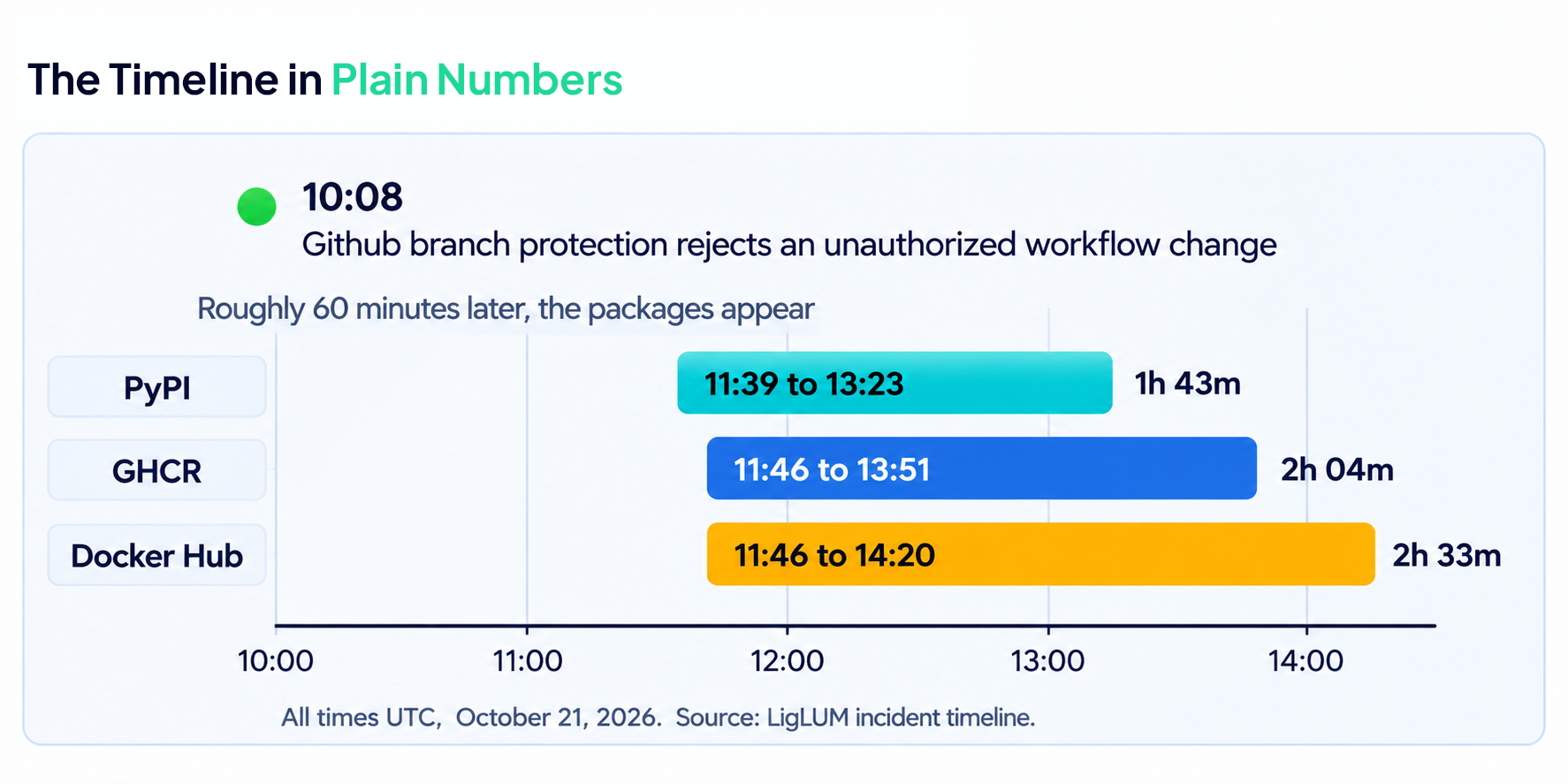
The Exposure Window, Minute by Minute
All times are UTC on October 21, 2026, as published in LiteLLM's incident report.
So the "two hours" in the headline numbers is the PyPI side. If your pipeline pulled a floating Docker tag like latest, your window ran longer.
Python Startup Hooks: How the Credential Theft Stayed Invisible
The malicious wheels did not hide in LiteLLM's code. They hid in the way Python starts.
Why You Did Not Need to Import LiteLLM to Be Hit
The compromised wheels installed three files outside the normal litellm directory: cook.pth, cook.py and sitecustomize.py. They landed in the environment's library directory, where interpreter startup processes them. Python runs any line in a .pth file that begins with import, and it later tries to import sitecustomize. The single line in cook.pth imported cook.py, which unpacked an embedded collector and ran it in a background thread. MITRE tracks the technique as T1546.018, Python startup hooks.
Four practical consequences follow:
- Starting Python was enough. Microsoft saw a Windows machine where a routine call to install an unrelated dependency triggered the collector.
- Deleting the litellm folder leaves the hooks behind, because they sit elsewhere in site-packages.
- LiteLLM did not have to be in your requirements file. Any dependency that declares an open-ended version range for it resolves to the newest release, poisoned or not.
- Do not investigate by running python or pip inside a suspect environment. That executes the hooks again.
What the Credential Collector Targeted
Microsoft's analysis of the recovered collector shows it was built to sweep up what engineer laptops, CI runners and AI gateway hosts tend to hold.
Microsoft cautions that a target appearing in the code does not prove it was successfully reached. What the code could attempt is still the right list to rotate against.
The haul was encrypted before it left the machine and posted to www[.]litellm[.]dev, a lookalike domain, not an official LiteLLM address. On Unix systems, a separate loader in sitecustomize.py was also built to fetch and run extra Python from a server named in a GitHub-hosted pointer file. Microsoft did not confirm that code ever ran, and the pointer file was empty when researchers checked. But because the file could be edited, the loader could have been re-armed without publishing another package.
Why AI Infrastructure Security Needs Production-Grade Scrutiny
Most teams review the code they write and simply trust the code they install. The LiteLLM compromise punished that split.
What Makes AI Gateway Security Different
A gateway sits between your applications and your model providers. In that position, Microsoft notes, it may hold provider API keys, database connection strings, workload identities, routing configuration and tenant policy data. The same package also runs on developer workstations, build agents, test systems and containers, so the exposure reaches well beyond the production gateway.
That is why a component like this deserves the treatment you would give a payments library or an auth service: pinned, verified, monitored, and run with the least privilege it can work with. The question to ask is not "is this project reputable?" It is "what does this component hold, and what would a hostile release do with it?"
The Second Compromise in Seven Months
October was not LiteLLM's first incident this year. On March 24, 2026, versions 1.82.7 and 1.82.8 reached PyPI, which LiteLLM believes traced back to a compromised Trivy dependency in its CI/CD scanning workflow. By LiteLLM's account, those packages were live for about 40 minutes before PyPI quarantined them. Aviatrix ties the wider campaign to a group called TeamPCP, and notes the 1.82.8 package already used a .pth file to run at interpreter startup.
Two different entry points, one lesson. The publisher's controls are not your controls. LiteLLM hardened its pipeline after March, and in October the attacker still defeated several independent safeguards to push a release. Your own pinning, verification and egress rules are the layer you actually own.
What AI/ML and Platform Engineers Should Do This Week
Three jobs, in this order: find out if you were exposed, recover properly if you were, then change the defaults so the next incident costs less.
Check Whether You Were Exposed
Run these from a shell that does not start Python. Starting Python in an infected environment re-runs the hooks, so the checks below only read files, lockfiles and image digests.
# 1. Search lockfiles, requirements files and CI logs for the bad version
grep -rnE 'litellm(\[[^]]*\])? *(==|-) *1\.107\.0([^0-9a-z]|$)' .

# 2. Look for the startup hook and the install record on disk
find / -xdev \( -name 'cook.pth' -o -name 'litellm-1.107.0.dist-info' \) 2>/dev/null

# 3. Look for the loader's lock file and the post-upload marker
ls -la /tmp/remote_code_loader.lock /tmp/.pc_once_* 2>/dev/null

# 4. Docker: look for the compromised image index
docker images --digests | grep 1bbcb1443bc9
A hit confirms exposure. A clean result does not prove safety: containers and temp-directory cleanup erase the markers, so also check CI logs and package caches from October 21. You are in scope if you installed 1.107.0 between 11:39 and 13:23 UTC, or ran the v1.107.0, latest, main-latest or main-stable images between 11:46 and 14:20 UTC.
Recover Properly, Not Quickly
- Isolate first. Stop Python processes where it is safe to, and keep automation from restarting them. Investigate from a known-clean machine.
- Rebuild instead of cleaning. Deleting cook.pth, cook.py and sitecustomize.py (plus matching cached bytecode) helps, but rebuilding images and virtual environments from verified artifacts is more reliable. Pin LiteLLM to 1.106.2 or another explicit version published before October 21.
- Assume the upload worked. If 1.107.0 ever ran on a host with outbound internet, treat exfiltration as successful.
- Rotate from a clean machine. That means model-provider keys (including every key stored in the LiteLLM proxy database, plus master and virtual keys), the database password, cloud and workload credentials, CI/CD secrets, registry and source-control tokens, SSH and GPG keys, and AI coding-tool tokens. Revoke active sessions too: rotating a password does not always kill a live token.
- Read your cloud logs. Look for GetCallerIdentity calls from the instance role around install time, then for any use of that role's credentials from outside your infrastructure.
Strengthen AI Supply Chain Security: Dependency Pinning and Egress Controls
None of these would have stopped the attacker publishing. All of them would have changed what happened to you.
- Hash-pin your dependencies. Floating ranges turn "latest" into your security policy.
- Add a cooldown on brand-new releases. A few days of delay in your mirror or resolver would have made a two-hour window irrelevant.
- Pin containers by digest, not by tag. Tags move. Digests identify immutable content. Verify signatures where the publisher provides them.
- Deny outbound traffic by default from workstations, build agents and gateway hosts, and allowlist only the model providers and services they need. The stolen data left over a single outbound request.
- Shrink what a stolen process can see. Use short-lived, scoped credentials and keep provider keys out of the environment of unrelated processes.
- Alert on new .pth files and sitecustomize.py appearing in site-packages.
# Generate a hash-pinned requirements file, then refuse anything that does not match
pip-compile --generate-hashes requirements.in -o requirements.txt
pip install --require-hashes -r requirements.txt
Beyond the Pipeline: AI Model Validation for the Stack on Top
Everything above protects the pipe. It says nothing about what comes out of it.
A gateway like LiteLLM also holds routing configuration, guardrail settings and tenant policy. Microsoft's analysis found a module that read model-configuration records from the proxy database, and a loader designed to run new code without a new release. After an incident like this one, most teams can say which version was installed. Far fewer can show, with evidence, that the system on top still behaves the way it did.
Those are validation questions:
- Are requests still routed to the models you approved?
- Are your guardrails still firing on the inputs they were built for?
- Does the system leak sensitive data in its outputs?
- Do answers still clear your accuracy and compliance thresholds?
At Loginsoft, we have spent 18 years in IT engineering and more than six in cybersecurity, discovering over 1,000 zero-days and analyzing more than 20,000 CVEs. Our AI Model Validation service brings that adversarial mindset to AI systems: independent third-party testing, corpus-based evaluation, human domain-expert review against 50+ failure criteria, hallucination mapping, and compliance documentation aligned to NIST AI RMF and the EU AI Act.
Validation does not replace incident response or supply chain controls. It gives you evidence, from outside your own team, that the system built on top of them works as intended.
Frequently Asked Questions
Q1. What is the LiteLLM supply chain attack?
On October 21, 2026, a compromised release pipeline published a malicious LiteLLM 1.107.0 to PyPI, Docker Hub and GHCR. It carried malware that steals credentials and a loader built to fetch more code. It followed an earlier compromise in March 2026 that affected versions 1.82.7 and 1.82.8.
Q2. Which LiteLLM versions were compromised?
In October, all seven PyPI wheels of 1.107.0 and the Docker tags v1.107.0, latest, main-latest and main-stable. In March, versions 1.82.7 and 1.82.8. LiteLLM's October report advises pinning to 1.106.2 or another explicit version published before October 21.
Q3. How do I know if I was affected by the LiteLLM compromise?
Search lockfiles, CI logs and package caches for 1.107.0, look for cook.pth and the litellm-1.107.0.dist-info folder, and check Docker digests against the compromised image index. Do it without starting Python. A clean result is not proof of safety, because containers and temp cleanup erase the markers.
Q4. Is LiteLLM safe to use now?
LiteLLM says it removed the compromised packages, cut maintainer credentials to the minimum, and runs releases from a private repository with Trusted Publishers, immutable Docker tags and signed images, with the signing key rotated on October 23. Whether that is enough is your call. Either way, pin by hash and digest, verify signatures, restrict egress, and limit what the gateway can reach.
Q5. How do Python .pth files work in supply chain attacks?
Python reads .pth files from site-packages at startup and executes any line that begins with import. A malicious package that installs one gets code execution every time Python starts, with no import of the package required. That is how the 1.107.0 collector ran, through cook.pth. Watch for new .pth files and sitecustomize.py in your environments.
Q6. Is removing the package enough to recover?
No. The startup files sit outside the litellm directory and survive its removal. Rebuild from verified artifacts, rotate every credential the host could reach, revoke active sessions, and assume the data left if the host had outbound internet.
Q7. How can I prevent a PyPI supply chain attack in AI projects?
Use hash-pinned lockfiles, add a cooldown on brand-new releases, pin containers by digest, deny outbound traffic by default, and give workloads short-lived, scoped credentials. Then test the AI system itself with an independent validation, so you have evidence that it still behaves as intended.
Table of Contents

11 New KEV Entries, 2 Zero-Days and an AI-Driven Intrusion: What Defenders Need to Know
11 New KEV Entries, 2 Zero-Days and an AI-Driven Intrusion: What Defenders Need to Know
Explore the key security, speed, and performance differences between TLS 1.3 and TLS 1.2
Ready to Find and Fix Your Security Weak Points?
LoginSoft's cybersecurity experts help organizations conduct thorough gap analyses, build prioritized remediation roadmaps, and achieve measurable security maturity improvements.
Schedule a Security Assessment
Hari Charan
Director of Security Research & Threat Intelligence
A MESSAGE FROM OUR TECHNOLOGY LEADER
The NVD enrichment cutback is not a surprise to us - it’s the inflection point we’ve been preparing for. At Loginsoft, we’ve spent years building the research depth and tooling infrastructure to independently enrich vulnerabilities at scale, with the accuracy and context modern security programs require. LOVI is our answer. Our mission is simple: ensure that no CVE relevant to your environment goes unanalyzed, unscored, or unactioned - regardless of what remains in NIST’s queue.
Key Takeaways
- Standard audit tools do not detect intentionally malicious packages. Tools like npm audit and pip-audit focus on known vulnerabilities, not malware behavior. A newly published malicious package with no CVE or advisory can pass these checks undetected.
- The attack surface is trust, not just code. Typosquatting, dependency confusion, and malicious updates exploit package-manager resolution and implicit trust. Developers and CI pipelines may install packages without verifying their provenance or behavior.
- Registry controls are only one layer of defense. Registry scanning, malware detection, and maintainer 2FA reduce risk, but attackers exploit gaps between these controls. Effective protection combines behavioral analysis, dependency pinning, SBOM governance, and build-environment isolation.
Stay Ahead
Get the Latest Cybersecurity Insights
Security research, threat intelligence, vulnerability updates, product news, and expert insights, delivered directly to your inbox. Stay informed. Stay secure.

BLOGS AND RESOURCES
Latest Articles
By using this website, you agree to the storing of cookies on your device to enhance site navigation, analyze site usage, and assist in our marketing efforts. View our Privacy Policy for more information.
Accept




© Copyright 2026, All Rights Reserved by Loginsoft
Privacy policy