
- Use it when retrieval is complex. Large database schemas, business-specific terminology, and extensive collections of SQL examples can benefit from semantic search to retrieve relevant contexts.
- Avoid it when simpler methods are sufficient. Small databases and straightforward questions can often be handled through direct schema retrieval or structured metadata filtering.
- Store relevant context. Table and column descriptions, business definitions, table relationships, and question-SQL examples can help the LLM generate more appropriate queries.
Introduction
Text-to-SQL systems allow people to ask questions about structured data using natural language instead of writing SQL queries. For example, a user might ask, “What were our top five products by revenue last quarter?” A Text-to-SQL system translates that question into a SQL query that retrieves the answer.
As Text-to-SQL applications become more advanced, an important architectural question arises: when does a vector database make sense? The answer depends less on whether the application uses AI and more on how much contextual information the system must retrieve before generating a query.
For small databases, retrieving the relevant schema or metadata directly may be enough. When a chatbot must work across large schemas, business-specific terminology, SQL examples, documentation, and other context sources, semantic retrieval can become useful.
What Is a Vector Database?
A vector database stores numerical representations of the meaning of text or other data. These representations are commonly called embedding.
The following types of information can be converted into embeddings and stored in a vector database:
- Table and column descriptions
- Database documentation
- Business terminology
- Example SQL queries
- Data dictionary entries
- KPI definitions
- Frequently asked questions
- Previous successful Text-to-SQL queries
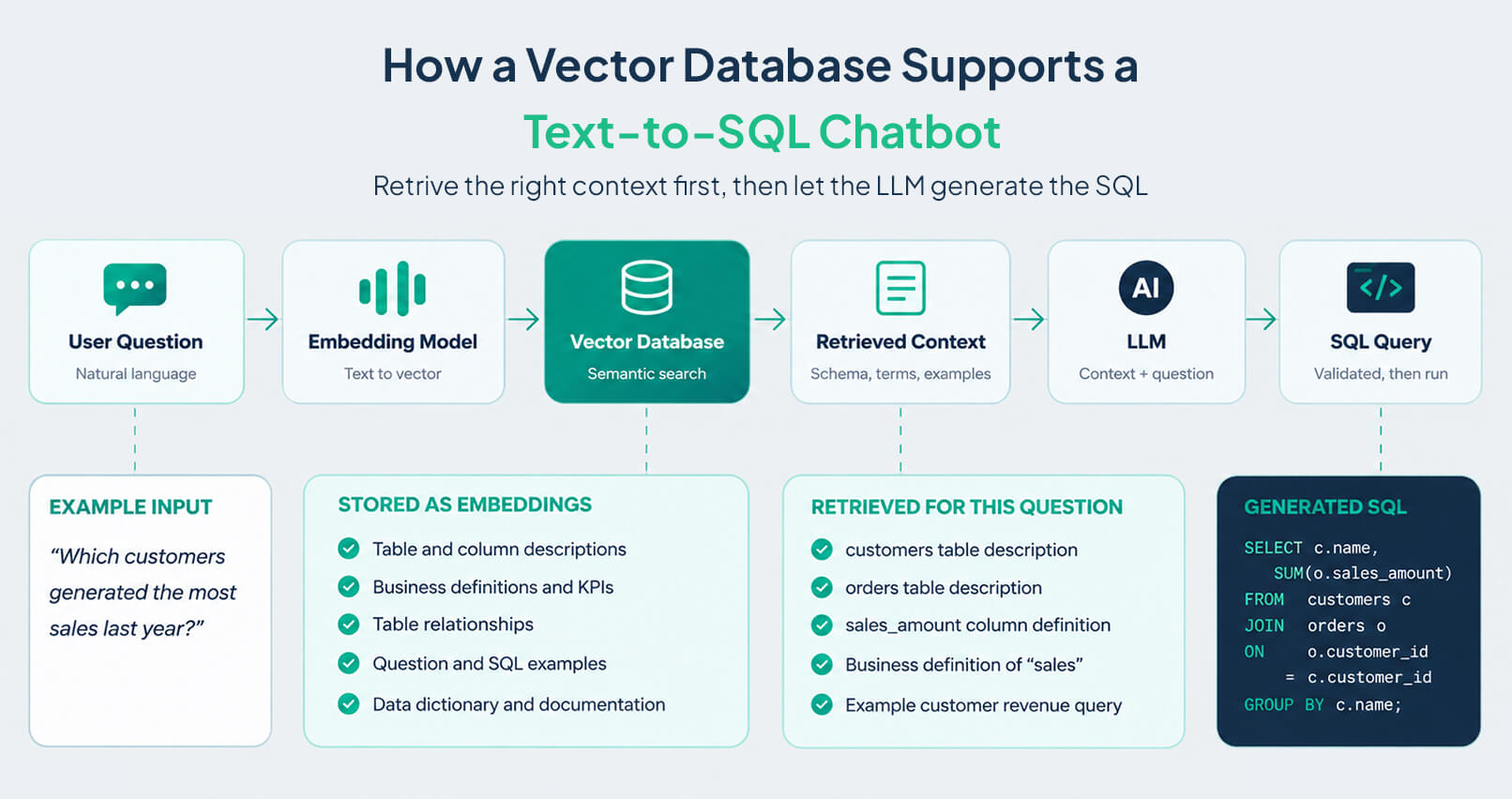
When a user asks a question, the chatbot converts it into an embedding and searches the vector database for semantically similar information.
For example, a user might ask:
- “Which customers generated the most sales last year?”
- The vector search might retrieve:
- A description of the customers table
- A description of the orders table
- The definition of the sales_amount column
- An example query that calculates customer revenue
- The business definition of “sales”
This information is then provided to the LLM to help it understand the database structure, business terminology, and requirements of the question. With this context, the LLM can generate a more relevant SQL query.
What Is Text-to-SQL?
Text-to-SQL is a technique that translates natural language questions into SQL queries that can be executed against a database. It allows people to ask questions about their data without having to write SQL themselves.
For example, a user might ask, “Which five products generated the most revenue last quarter?” A Text-to-SQL system interprets the question, identifies the relevant data, and generates a SQL query that retrieves the answer.
When Should You Use a Vector Database for Text-to-SQL?
The decision often depends on how much contextual information the chatbot must retrieve before generating accurate SQL. A vector database is particularly useful when the system needs to find relevant schema details, business definitions, documentation, or previously validated SQL examples.
Large or Complex Database Schemas
A large database may contain hundreds of tables and thousands of columns. Most questions require only a small portion of that schema.
For example, a question about customer revenue does not require unrelated HR, inventory, or salary tables. A retrieval system can identify relevant schema descriptions and metadata, reducing unnecessary context and token usage.
For complex schemas, semantic search can help identify potentially relevant tables and columns. Structured schema metadata, foreign keys, and join conditions should also be used to establish the correct relationships between tables.
Business-Specific Terminology
The terms people use in business conversations do not always match database field names.
For example, a finance team might ask for “sales,” while the database contains several revenue-related columns with different meanings. Storing business definitions, terminology, and metric descriptions gives the chatbot additional context to map the user's wording to the appropriate data.
Large Collections of SQL Examples
Companies may have thousands of previously tested SQL queries. A vector database can retrieve examples that are semantically similar to a new request, giving the LLM established query patterns to reference when generating SQL.
Previously successful queries can provide useful examples, but they do not guarantee that a newly generated query will be correct. Generated SQL should still be checked for correctness, permissions, and execution safety.
Retrieval-Augmented Generation (RAG)
A vector database can support retrieval-augmented generation (RAG) when a Text-to-SQL chatbot needs additional information, such as business definitions, data governance rules, company policies, or database documentation.
Relevant information can be retrieved and provided to the LLM before SQL generation. This helps the model interpret the question in the appropriate business and technical context.
Frequently Changing Data Models
Database structures can change when tables, columns, or relationships are added, removed, or renamed. A retrieval system can store and index updated schema descriptions and metadata so the chatbot can access relevant information without changing the underlying LLM.
However, the vector database does not automatically synchronize with the source database. Automated metadata synchronization and re-indexing are needed to ensure that the retrieved information reflects the current schema.
When Do You Not Need a Vector Database?
A vector database is not required for every Text-to-SQL application. When the database and questions are relatively simple, direct schema retrieval or structured metadata lookup may be sufficient.
Small Databases
If a database has only a few tables and simple relationships, the relevant schema can usually be provided directly to the LLM. An additional vector database layer may not be necessary.
Simple Questions
When a question clearly maps to a particular table or column, the LLM can often generate the SQL query without retrieving additional context through vector search.
When Deterministic Metadata Retrieval Is Enough
If user questions can be reliably mapped to data domains using keywords, metadata, or predefined rules, structured filtering may be simpler and more predictable than embedding-based search.
The appropriate approach depends on the database structure, retrieval requirements, and complexity of the questions being asked.
What Should You Store in a Vector Database for Text-to-SQL?
The value of a vector database depends largely on the quality and relevance of the stored information. For a Text-to-SQL chatbot, focus on information that helps the LLM understand the database, business context, and query patterns.
Table Descriptions
Store descriptions explaining what each table contains, its purpose, and the type of data it represents.
Column Descriptions
Store the meaning and purpose of important columns, including how their values are calculated or interpreted.
Table Relationships
Store information about relationships between tables and columns to help the system identify relevant data sources and determine appropriate joins. Where possible, supplement descriptions with structured schema metadata, foreign keys, and explicit join conditions.
Business Definitions
Store definitions of business terms, metrics, and KPIs so the LLM can interpret user questions according to the organization's terminology.
SQL Examples
Store question-and-SQL pairs that can be retrieved when a new question is similar to a previously solved query. These examples can help the LLM follow established query patterns.
Supporting Documentation
Store relevant data dictionaries, analytics documentation, metric definitions, and other reference material that provides additional context during query generation.
Conclusion
You do not always need a vector database for a Text-to-SQL chatbot. If the database is small and the questions are straightforward, retrieving the schema or metadata directly may be enough. When database structures and business requirements become more complex, semantic search can help the chatbot retrieve relevant schema descriptions, definitions, documentation, and SQL examples.
Use a vector database when it solves a specific retrieval problem, rather than simply because it is available. Start with the simplest approach that meets your requirements and introduce semantic retrieval when the scale and complexity of the application justify it.
FAQs
Q1. What Is a Text-to-SQL LLM?
A Text-to-SQL LLM uses a large language model to translate natural language questions into SQL queries. It helps users retrieve information from structured databases without having to write SQL themselves.
Q2. What Is a Vector Database in a Text-to-SQL Chatbot?
A vector database stores embeddings representing information such as schema descriptions, business definitions, documentation, and example SQL queries. The chatbot searches this information to retrieve relevant context before the LLM generates SQL.
Q3. Do I Always Need a Vector Database for Text-to-SQL?
No. If your database is small and the questions are straightforward, direct schema retrieval or structured metadata lookup may be sufficient.
Q4. When Does a Vector Database Make Sense for Text-to-SQL?
It can be useful when working with large or complex schemas, business-specific terminology, extensive collections of SQL examples, RAG requirements, or frequently changing data models.
Q5. What Should I Store in a Vector Database?
Useful information includes table and column descriptions, business definitions, SQL question-and-answer examples, and supporting documentation such as data dictionaries. Structured schema information and relationships should also be available to support accurate query generation.
Q6. How Does a Vector Database Improve SQL Accuracy?
A vector database can retrieve relevant schema descriptions, definitions, and SQL examples to help the LLM identify appropriate tables and columns and follow established query patterns. Accuracy still depends on retrieval quality, current metadata, query validation, and the model's ability to generate valid SQL.
Q7. Can I Use Keyword or Metadata Filtering Instead?
Yes. If questions can be reliably mapped to data domains using keywords, metadata, or predefined rules, structured filtering can be simpler and more predictable than embedding-based retrieval.
Q8. How Does a Vector Database Help When My Schema Changes Often?
A retrieval system can index updated schema metadata so the chatbot can access current table descriptions, column definitions, and relationships without changing the underlying LLM. Automated synchronization and re-indexing are necessary to keep the stored information up to date.
Table of Contents
AI-Powered Ransomware, PHP2Shell and Brotli Headline This Week’s Threat Landscape
AI-Powered Ransomware, PHP2Shell and Brotli Headline This Week’s Threat Landscape
Explore the key security, speed, and performance differences between TLS 1.3 and TLS 1.2
Ready to Find and Fix Your Security Weak Points?
LoginSoft's cybersecurity experts help organizations conduct thorough gap analyses, build prioritized remediation roadmaps, and achieve measurable security maturity improvements.
Schedule a Security Assessment
Hari Charan
Director of Security Research & Threat Intelligence
A MESSAGE FROM OUR TECHNOLOGY LEADER
The NVD enrichment cutback is not a surprise to us - it’s the inflection point we’ve been preparing for. At Loginsoft, we’ve spent years building the research depth and tooling infrastructure to independently enrich vulnerabilities at scale, with the accuracy and context modern security programs require. LOVI is our answer. Our mission is simple: ensure that no CVE relevant to your environment goes unanalyzed, unscored, or unactioned - regardless of what remains in NIST’s queue.
Key Takeaways
- Standard audit tools do not detect intentionally malicious packages. Tools like npm audit and pip-audit focus on known vulnerabilities, not malware behavior. A newly published malicious package with no CVE or advisory can pass these checks undetected.
- The attack surface is trust, not just code. Typosquatting, dependency confusion, and malicious updates exploit package-manager resolution and implicit trust. Developers and CI pipelines may install packages without verifying their provenance or behavior.
- Registry controls are only one layer of defense. Registry scanning, malware detection, and maintainer 2FA reduce risk, but attackers exploit gaps between these controls. Effective protection combines behavioral analysis, dependency pinning, SBOM governance, and build-environment isolation.
Stay Ahead
Get the Latest Cybersecurity Insights
Security research, threat intelligence, vulnerability updates, product news, and expert insights, delivered directly to your inbox. Stay informed. Stay secure.

BLOGS AND RESOURCES
Latest Articles
By using this website, you agree to the storing of cookies on your device to enhance site navigation, analyze site usage, and assist in our marketing efforts. View our Privacy Policy for more information.
Accept




© Copyright 2026, All Rights Reserved by Loginsoft
Privacy policy