
- Minimal, Hardened, and Secure Images Serve Different Purposes: Minimal images reduce unnecessary components, hardened images strengthen security configurations, and secure images ensure protection throughout the image lifecycle.
- Smaller Images Don't Guarantee Better Security: Minimal images reduce the attack surface, but vulnerabilities can still exist. Security requires proper configurations, vulnerability scanning, and regular validation.
- Continuous Security Is Essential: Use trusted base images, enforce least-privilege access, verify image integrity, integrate security checks into CI/CD pipelines, and regularly update and monitor container images.
Container images are the foundation of modern cloud-native applications. They package everything an application needs to run, including its code, runtime, libraries, dependencies, and configuration. This allows workloads to run consistently across development, testing, and production environments.
However, not all container images offer the same level of security.
A minimal container image removes components that an application does not need. A hardened container image goes further by applying security-focused configurations and restricting potential attack paths. A secure container image takes a broader approach, bringing together trusted sources, vulnerability management, secure build processes, verification, and ongoing maintenance.
These terms are often used interchangeably, but they address different aspects of container security. Understanding the differences helps organizations choose an approach that balances security, performance, compatibility, and operational requirements.
What is a Container Image?
A container image is a packaged, read-only template used to create and run containers. It typically includes application code, the required runtime, system libraries, dependencies, and other files needed to execute a workload.
Container images help development and operations teams build repeatable application environments. The same image can move through local development, CI/CD pipelines, virtual machines, and Kubernetes clusters without requiring teams to recreate the environment at every stage.
However, every component included in an image introduces a potential point of exposure.
An outdated library may contain a known vulnerability. An unnecessary utility could give an attacker additional options after compromising a container. An application running with excessive privileges could also make an incident more difficult to contain.
This is why container image security involves more than selecting a base image. Teams need to understand what goes into an image, how those components are configured, how the image is built, and how it is maintained after deployment.
What is a Hardened Container Image?
A hardened container image is an image that has been deliberately configured to reduce security weaknesses and limit unnecessary exposure.
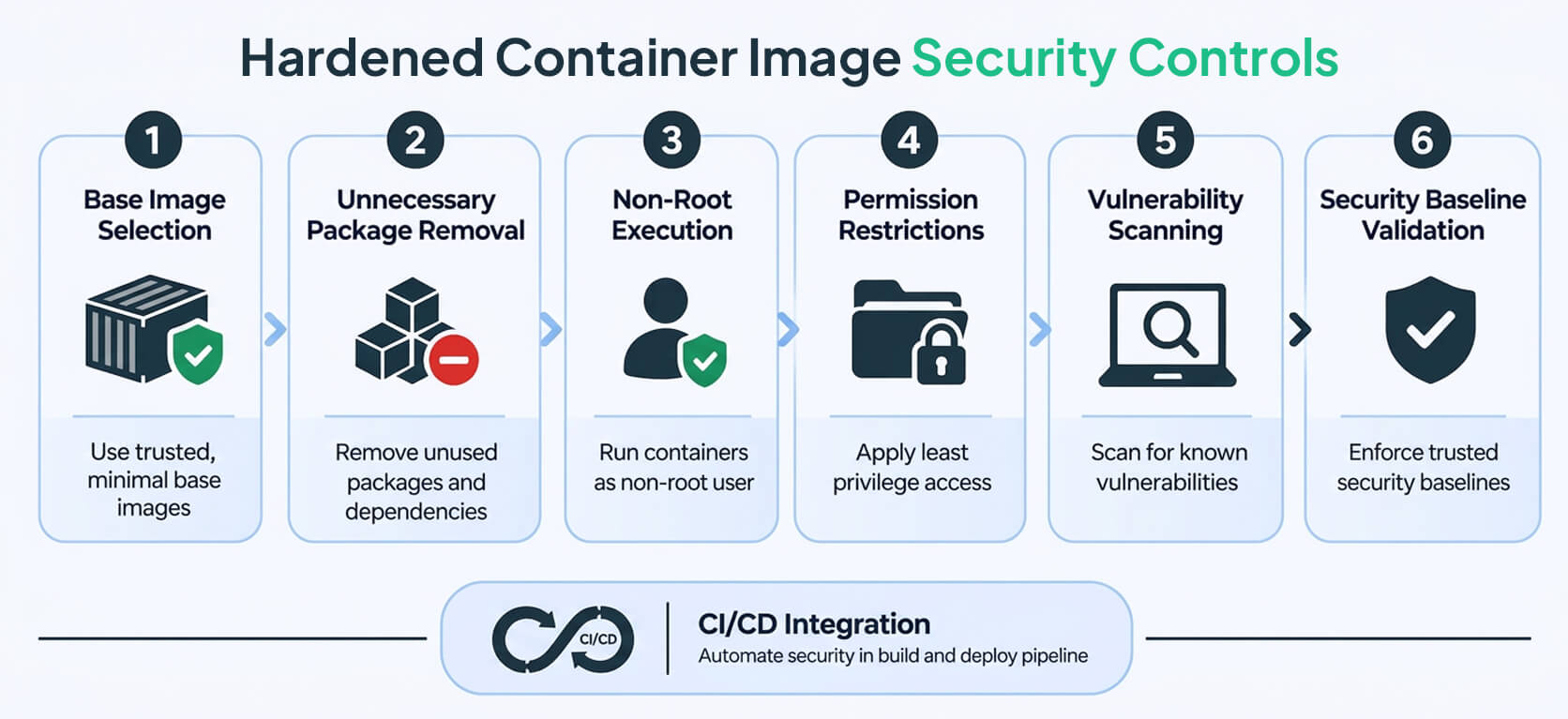
The hardening process typically involves removing components that are not required, applying security updates, restricting permissions, reducing privileges, and establishing safer default configurations.
The difference between a minimal image and a hardened image comes down to the objective. Minimization focuses on reducing what is included. Hardening focuses on improving the image's security posture and the controls surrounding its use.
The controls used during hardening depend on several factors, including the operating system, application runtime, workload requirements, and applicable security standards.
How Do Hardened Container Images Work?
Hardening starts with selecting an appropriate base image. That image is then reviewed and configured according to defined security requirements.
Depending on the workload, the process may involve:
- Running applications as non-root users: Avoid unnecessary root privileges wherever the application supports it.
- Removing unused binaries and utilities: Eliminate tools, shells, and package managers that are not required at runtime.
- Restricting file permissions: Limit write access and ensure that files and directories have appropriate permissions.
- Reducing installed packages: Keep the software inventory as small as practical without affecting application functionality.
- Applying security updates: Use supported software versions and keep components updated.
- Scanning for vulnerabilities: Identify known vulnerabilities and track their remediation.
- Checking security configurations: Validate the image against relevant security baselines.
- Integrating security checks into CI/CD: Identify issues during the build and release process rather than waiting until production.
It is important to understand that not every security control belongs inside the container image itself.
For example, Kubernetes admission policies, runtime restrictions, network policies, and secrets management are generally implemented through deployment configurations or platform-level controls.
A hardened image should work alongside these safeguards, not serve as a replacement for them.
Benefits of Hardened Container Images
Stronger Security Defaults
Security-focused configurations help address avoidable weaknesses before an image reaches production.
Reduced Exposure
Removing unnecessary components and restricting privileges can limit the number of potential attack paths available to an attacker.
More Consistent Security Practices
Organizations can use standardized hardened images across applications and environments, making it easier to maintain a common security baseline.
Improved Governance
Documented image requirements, vulnerability scanning, and configuration validation provide useful evidence for security reviews and compliance processes.
Better Integration with DevSecOps
Security requirements can be incorporated directly into build and release pipelines, allowing teams to identify and address issues earlier.
Limitations of Hardened Container Images
Hardening is not a one-time activity.
An image that meets security requirements today may become vulnerable when a new CVE is disclosed, a dependency reaches end of life, or a security patch becomes available. Regular reviews, updates, and validation are necessary to keep it relevant.
There can also be compatibility challenges. Some applications depend on specific libraries, filesystem permissions, capabilities, or operating system features. Restricting these without testing can affect application behavior.
Teams should therefore validate hardened images against actual application requirements before introducing them into production.
Best suited for: Production workloads, enterprise applications, Kubernetes environments, and systems that need a consistent and demonstrable security baseline.
What is a Minimal Container Image?
A minimal container image contains only the components needed to run a particular application or workload.
Rather than including a full set of operating system utilities, development tools, and unrelated packages, it keeps the image focused on the application, its runtime, and its required dependencies.
The idea is straightforward: if a component is not needed to run the application, there may be little reason to include it in the production image.
Reducing unnecessary software can make images smaller, simplify dependency management, and limit the number of components that need to be monitored for vulnerabilities.
How Do Minimal Container Images Work?
The process begins with selecting a suitable base image and including only the runtime, dependencies, and application files required for execution.
Depending on the workload, teams might use a slim operating system distribution, a minimal runtime image, or a distroless-style image that does not include a conventional shell or package manager.
Consider a Python-based API.
Its production image may only need the Python runtime, the application's required libraries, and the application code. Compilers, interactive debugging tools, and unrelated operating system utilities may be necessary during development but not when the application is running in production.
Removing those components helps reduce image size and the number of packages that need to be tracked and patched. It can also make image distribution faster and simplify deployment workflows.
Benefits of Minimal Container Images
Smaller Image Size
Fewer components generally mean less storage is required and less data needs to be transferred when images are deployed.
Reduced Attack Surface
Removing unused software reduces the number of components that could potentially introduce vulnerabilities or be exploited.
Simpler Dependency Management
A smaller package inventory makes it easier to understand which components are present and prioritize relevant security findings.
More Efficient Deployments
Smaller images can be faster to pull and distribute, although actual performance depends on the infrastructure, network, and image-caching strategy.
Limitations of Minimal Container Images
A smaller image is not automatically a secure image.
It may still contain an outdated runtime, a vulnerable application dependency, or an insecure configuration. Reducing the number of packages does not eliminate the need for vulnerability management and security validation.
Minimal images can also make troubleshooting more difficult. When shells, package managers, and diagnostic utilities are removed, teams need alternative ways to investigate problems.
External debugging tools, observability platforms, and well-defined incident-response procedures become particularly important in these environments.
Best suited for: Production APIs, microservices, and containerized workloads with clearly defined dependencies and a need for lean runtime environments.
What Is a Secure Container Image?
A secure container image is an image whose security is assessed and managed through appropriate controls throughout its lifecycle.
Unlike minimal and hardened images, the term describes a broader security objective rather than a specific image format or universally standardized configuration.
A secure image strategy considers where an image comes from, how it is built, what software it contains, how it is configured, and how its integrity and vulnerabilities are managed over time.
Common practices include trusted image sourcing, vulnerability management, secure build processes, configuration validation, integrity verification, access controls, and regular maintenance.
A minimal image or a hardened image can form part of this approach. However, neither characteristic alone is enough to establish that an image is secure.
What Makes a Container Image Secure?
Several practices contribute to a stronger container image security strategy.
1. Trusted provenance
Images should come from approved sources. Where supported, organizations should be able to verify their origin and understand how they were built.
2. Vulnerability Management
Images should be scanned for known vulnerabilities. Findings need to be evaluated based on severity, exploitability, exposure, and the context of the workload rather than simply counting the number of reported CVEs.
3. Secure Configuration
The image and application should follow the organization's security requirements, including appropriate permissions, privileges, and configuration settings.
4. Integrity And Authenticity
Image digests, signatures, and verification mechanisms help establish the integrity and authenticity of container images.
These mechanisms have different roles. An image digest identifies the exact image content. A digital signature helps verify the artifact and its signer. Build provenance provides information about where and how the artifact was produced.
Together, these controls can improve trust and traceability across the software supply chain. However, a valid signature alone does not prove that an image was built securely or contains no vulnerabilities.
5. Controlled Access
Access to build systems, image registries, publishing workflows, and deployment approvals should be restricted to authorized users and services.
6. Ongoing Maintenance
Images need to be rebuilt, patched, tested, and replaced when vulnerabilities or operational requirements change.
7. Deployment Safeguards
Image security should be supported by runtime configuration, workload identity, secrets management, network controls, and least-privilege policies.
Benefits of a Secure Container Image Strategy
A well-managed image security strategy gives organizations better visibility into the software running across their environments.
It helps teams identify issues earlier, apply consistent security requirements, and make more informed decisions about which images are approved for deployment.
It also improves traceability. Teams can track which image version was tested, what vulnerabilities were identified, which remediation steps were completed, and which version was approved for production.
However, it is important not to treat a security scan, certification, or image designation as a guarantee of complete protection.
New vulnerabilities can emerge after an image has been approved. Application code may contain security flaws, and deployment environments can introduce risks that are not visible when examining the image itself.
Best suited for: Organizations that need end-to-end image risk management, particularly those running production systems, regulated workloads, or large containerized environments.
Hardened vs. Minimal vs. Secure Container Images: Key Differences
Although these three approaches are closely related, they address different parts of container image security.
The simplest way to understand the difference is this:
- Minimal describes what is included in the image.
- Hardened describes how the image is configured to improve security.
- Secure describes the broader approach to managing image security over time.
These approaches are not mutually exclusive. A container image can be minimal, hardened, and managed through a secure lifecycle at the same time.
Can a Minimal Container Image Be More Secure Than a Hardened Image?
Not necessarily.
A minimal image may contain fewer installed packages, which can reduce the number of potential sources of vulnerabilities. But a small image can still use an outdated runtime, contain a vulnerable dependency, or run with unsafe permissions.
A hardened image may have stronger security controls even if it contains more components than a minimal image.
The difference becomes clearer when we compare two hypothetical images.
Image A: A very small container image containing an outdated application runtime with a known exploitable vulnerability.
Image B: A slightly larger container image using a supported runtime, current dependencies, restricted permissions, and a tested security baseline.
Despite its larger size, Image B may offer a stronger security posture.
This is why image size and package count should not be the only criteria when evaluating container security. Organizations also need to consider vulnerability exposure, configuration, provenance, maintenance practices, and the environment in which the image will run.
It is also worth remembering that vulnerability counts alone do not provide a complete picture. The relevance of a vulnerability depends on factors such as exploitability, exposure, affected functionality, and the workload's configuration.
How Minimal, Hardened, and Secure Images Work Together
Rather than choosing one approach over the others, organizations can combine all three as part of a broader container security strategy.
A minimal image removes unnecessary components. Hardening applies security-focused configurations to the image and its contents. Lifecycle security practices help ensure the image comes from a trusted source, is properly tested, and remains maintained as vulnerabilities and security requirements change.
Consider an organization deploying a customer-facing API.
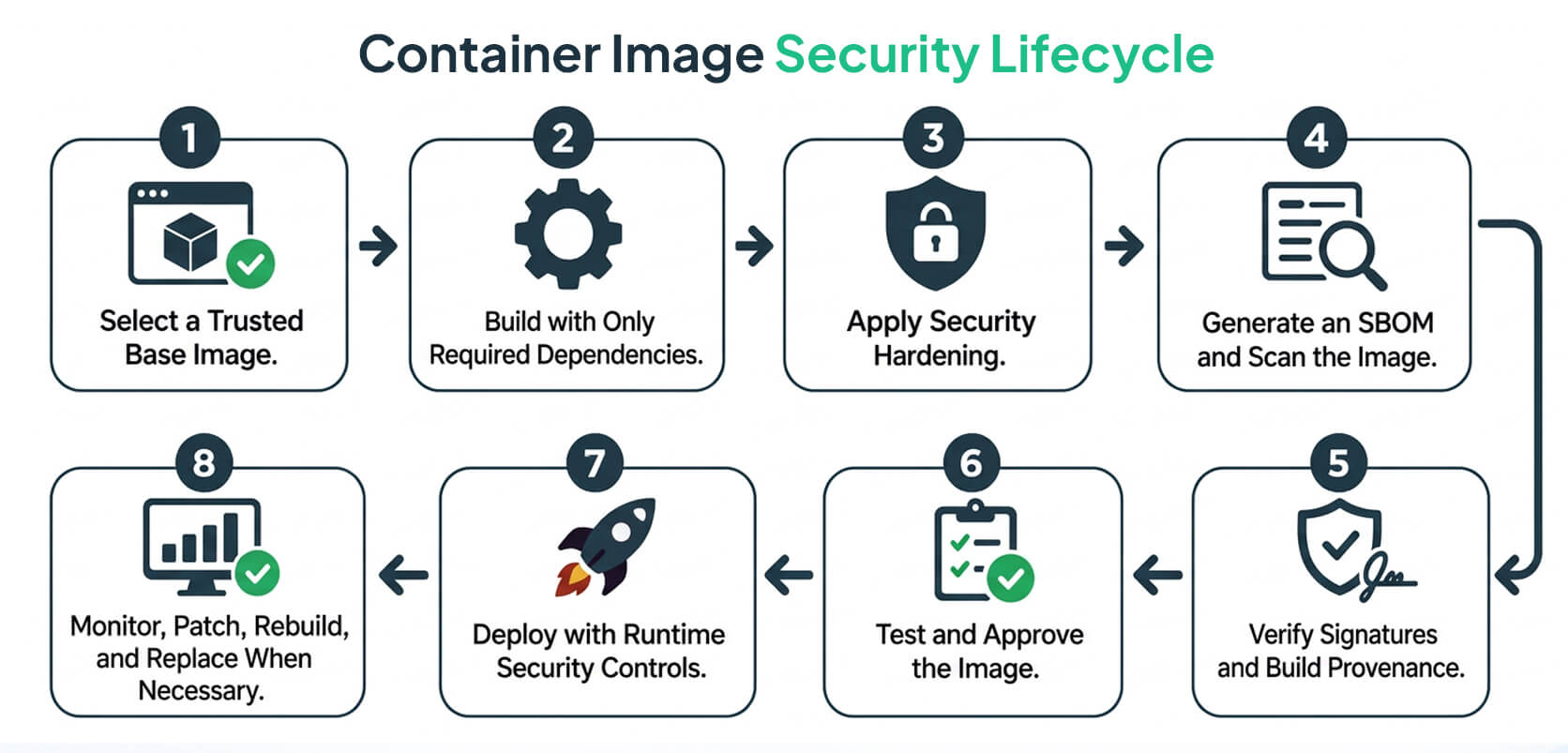
Its team might follow this process:
- Select an appropriate base image that is actively maintained.
- Include only the application runtime and required dependencies in the final image.
- Apply security-focused configurations, including non-root execution where feasible.
- Scan the image and evaluate vulnerability findings in the context of the workload.
- Verify image provenance and integrity using appropriate controls.
- Test the image in a staging environment before approving it for production.
- Enforce deployment policies and least-privilege runtime settings.
- Rebuild and redeploy the image when required security updates or fixes become available.
This approach avoids relying on image minimization, hardening, or vulnerability scanning as a standalone security solution.
How to Choose the Right Container Image for Your Workload
There is no single container image that works for every application. The right choice depends on the application's dependencies, security requirements, operational model, and deployment environment.
Here are some considerations for different workloads.
For Development and Testing
Development images often require compilers, package managers, shells, and debugging utilities. These tools make it easier for developers to build applications, investigate issues, and test changes.
However, many of these components are unnecessary once the application moves to production.
Where practical, use multi-stage builds to keep build-time tools out of the final runtime image. Security scanning and access controls should also be part of the development pipeline rather than activities reserved for the deployment stage.
For Production Applications
Production environments should prioritize supported base images, clear dependency inventories, secure configurations, and a reliable update process.
A minimal and hardened runtime image can help reduce unnecessary exposure while maintaining the components required by the application.
The important consideration is compatibility. Security restrictions should be tested against real application requirements before an image is approved for production.
For Kubernetes Environments
Container image security is only one part of Kubernetes workload security.
Along with selecting and maintaining appropriate images, teams should consider:
- Non-root container execution.
- Restricted Linux capabilities.
- Read-only root filesystems where feasible.
- Appropriate resource limits.
- Kubernetes admission controls.
- Network policies.
- Secrets management.
These controls operate at different layers of the environment. For example, image-level configuration and Kubernetes security context settings are not interchangeable. They should be evaluated together rather than assuming that a hardened image automatically secures the entire Kubernetes workload.
For Regulated or High-Risk Environments
Organizations operating under strict security or governance requirements may need more than a basic image hardening process.
Their requirements may include documented image baselines, traceable builds, vulnerability remediation policies, provenance verification, controlled access, and evidence of security validation.
The best approach is to map these controls to the actual regulatory, contractual, and internal requirements that apply to the organization. Simply labeling an image as hardened or secure does not establish compliance.
For Legacy Applications
Legacy applications can be more difficult to secure because they may depend on older runtimes, libraries, or operating system components.
Start by documenting application dependencies and identifying the most significant risks.
Security changes should be introduced incrementally, with compatibility testing at each stage. Unsupported components should be replaced where possible.
If a vulnerability cannot be addressed immediately, document the associated risk and consider suitable compensating controls while planning remediation.
Best Practices for Building and Maintaining Secure Container Images
Selecting a suitable base image is a good starting point, but maintaining image security requires consistent processes throughout development, deployment, and ongoing operations.
The following practices can help organizations establish a more reliable approach.
1. Choose Maintained Base Images
Start with images from trusted and approved sources. Check whether the operating system, runtime, and dependencies have an active maintenance process and continue to receive security updates.
Using an image that is no longer supported can introduce unnecessary risk, even if it initially appears to meet your application's requirements.
2. Remove Unnecessary Components
Keep the production image focused on what the application actually needs.
Compilers, test frameworks, package managers, and debugging utilities may be useful during development, but they should not automatically become part of the final runtime image.
Multi-stage builds are useful when you need to separate build dependencies from the components required to run the application.
3. Pin and Track Dependencies
Use controlled dependency versions and maintain an inventory of the software included in each image.
Generating a software bill of materials (SBOM), where appropriate, can improve visibility into installed components and their versions.
An SBOM provides an inventory of software components. It does not, by itself, prove that an image is secure or that its components are free from vulnerabilities.
Pinning dependencies helps make builds more reproducible. However, pinned versions still need to be reviewed and updated when security fixes become available.
4. Scan Images Throughout the CI/CD Pipeline
Integrate container image scanning into build and release workflows.
When vulnerabilities are identified, evaluate them based on severity, exploitability, exposure, and potential business impact. A large vulnerability count does not necessarily mean every finding presents the same level of risk.
Establish clear policies for blocking releases, approving exceptions, and tracking remediation. Scanning is useful only when findings lead to appropriate action.
5. Apply Least Privilege
Avoid running applications as root unless there is a clear technical requirement.
Restrict capabilities, filesystem permissions, and write access according to what the workload actually needs.
Keep in mind that some least-privilege controls are enforced through the container runtime or orchestration configuration rather than the image itself.
6. Verify Provenance and Image Integrity
Use approved container registries and, where appropriate, implement image signing and signature verification.
Image digests can identify exact image content, while signatures help establish authenticity and verify the signer. Build provenance provides additional information about how and where an image was produced.
Control who can build and publish images, and establish clear approval requirements for images entering production.
These practices help reduce the risk of unauthorized or unexpected modifications to container images and improve software supply-chain traceability.
7. Establish an Image Update Policy
Define how frequently images are reviewed, how critical vulnerabilities are handled, and how updated versions are tested and released.
Rebuilding from a maintained base image is often a better approach than relying on manual modifications to long-running containers.
Organizations should also have a process for identifying and replacing outdated images that are already deployed.
8. Test Hardened Images Before Production
A security improvement should not introduce unexpected application failures.
Before approving a hardened image, test startup behavior, application dependencies, permissions, observability, and operational procedures.
If a particular restriction creates compatibility issues, document the trade-off. Then determine whether the application can be adjusted or whether another security control can address the same risk.
9. Secure the Deployment Environment
Even a well-maintained container image can be deployed insecurely.
Apply suitable runtime restrictions, network segmentation, secrets management, identity controls, and monitoring to the workload.
Container image security and runtime security should be treated as complementary parts of the same strategy.
Common Misconceptions About Container Image Security
Some common assumptions about container images can lead organizations to overlook important security risks.
A Smaller Image Is Always More Secure
A smaller image generally contains fewer components to manage, but that does not mean it is free from vulnerabilities.
It may still include vulnerable software or unsafe configurations. Image size is one factor to consider, not a complete measure of security.
A Hardened Image Is Vulnerability-Free
Hardening helps reduce specific security risks, but it cannot eliminate every possible vulnerability.
New CVEs, application-level weaknesses, and configuration mistakes can still affect a hardened image. Regular scanning, updates, and validation remain necessary.
Scanning an Image Makes It Secure
Scanning helps identify known vulnerabilities, but it does not automatically fix them or guarantee that every relevant risk will be detected.
Findings need to be reviewed, prioritized, remediated, and checked again.
Container Image Security Ends at Deployment
Image security requires attention even after deployment.
New vulnerabilities, changes in threat intelligence, and updates to security requirements may mean that an existing image needs to be rebuilt or replaced.
Image Security Alone Protects the Entire Containerized Application
Image-level controls are important, but the security of a containerized application also depends on its code, deployment configuration, runtime permissions, infrastructure, network exposure, and secrets handling.
A strong security strategy needs to address these areas together.
Conclusion
Minimal, hardened, and secure container images serve different purposes, but they work best when treated as complementary parts of a container security strategy.
A minimal image removes unnecessary components and helps reduce the attack surface. A hardened image introduces deliberate security configurations and controls. A secure image represents the broader objective of managing trust, vulnerabilities, configuration, integrity, and maintenance throughout the image lifecycle.
For many production environments, combining all three approaches offers a more practical way to manage container security.
Start with an appropriate and maintained base image. Remove components the application does not need, apply relevant hardening controls, validate the image against security requirements, and establish a process for keeping it updated.
Ultimately, container security is not about making an image as small as possible or applying the strictest possible configuration. It is about reducing risk while ensuring that applications remain reliable, compatible, and maintainable.
For teams looking to strengthen container security at scale, Loginsoft's hardened container images provide a relevant starting point for evaluating image security as part of a broader cloud-native security strategy.
FAQs
Q1. What is the difference between a hardened container image and a minimal container image?
A minimal container image includes only the components required to run a workload. Its primary goal is to reduce image size and remove unnecessary software.
A hardened container image focuses on security. It applies configurations and controls such as restricted permissions, reduced privileges, security updates, and vulnerability validation.
An image can be both minimal and hardened.
Q2. Is a minimal container image more secure?
Not automatically. Minimal images can reduce the attack surface by removing unnecessary components, but they may still contain vulnerable dependencies, outdated runtimes, or insecure configurations.
Actual security also depends on image maintenance, trusted sourcing, vulnerability management, and deployment controls.
Q3. What makes a container image hardened?
Hardening may involve removing unnecessary packages, applying security updates, restricting permissions, reducing privileges, using secure defaults, and validating the image against relevant security requirements.
The exact controls depend on the workload, operating system, application requirements, and security baseline.
Q4. What is a secure container image?
A secure container image is managed using appropriate controls for its source, build process, software components, configuration, integrity, vulnerability exposure, and ongoing maintenance.
The term describes a broader security approach. It does not guarantee that an image is completely free from vulnerabilities.
Q5. Can a container image be minimal, hardened, and secure at the same time?
Yes. These concepts complement one another.
An image can contain only the components needed to run an application, apply security-focused configurations, and be maintained through vulnerability management, provenance verification, testing, and controlled deployment practices.
Q6. How do hardened container images reduce the attack surface?
Hardened images can reduce potential attack paths by removing unnecessary software, limiting permissions, applying secure configurations, and reducing unnecessary capabilities or services.
How effective these measures are depends on the controls implemented and the requirements of the application.
Q7. How often should container images be updated?
Organizations should review and update images according to a defined maintenance policy.
Critical vulnerabilities, newly available security fixes, unsupported dependencies, and changes in security requirements may require an update before the next scheduled review.
Q8. Are distroless container images the same as hardened container images?
No. Distroless images are designed to provide a minimal runtime environment, generally excluding a conventional operating system shell and package manager.
Hardening is a broader process that can include configuration changes, vulnerability management, permission restrictions, and security validation.
A distroless image is not automatically hardened or free from vulnerabilities.
Q9. How can organizations check container image vulnerabilities?
Organizations can use container image scanners and software composition analysis tools to identify known vulnerabilities in operating system packages and application dependencies.
The results should be evaluated based on relevance, severity, exploitability, and exposure. Identified issues should then be prioritized, remediated, and checked again.
Q10. What should organizations look for in a hardened container image solution?
Evaluate the security baseline, supported components, vulnerability management process, image provenance, validation practices, and ongoing update approach.
The solution should also be compatible with the organization's application requirements, CI/CD pipeline, and deployment environment.
Q11. Do hardened container images replace Kubernetes security controls?
No. Hardened images are one part of a broader Kubernetes security strategy.
They should complement controls such as least-privilege workloads, admission policies, network policies, secrets management, and runtime monitoring.
Securing a Kubernetes environment requires controls at both the image and platform levels.
Q12. How does Loginsoft help with hardened container images?
Organizations can review Loginsoft's Hardened Container Images service page to understand its service offering and evaluate its relevance to their cloud-native security requirements.
Table of Contents

11 New KEV Entries, 2 Zero-Days and an AI-Driven Intrusion: What Defenders Need to Know
11 New KEV Entries, 2 Zero-Days and an AI-Driven Intrusion: What Defenders Need to Know
Explore the key security, speed, and performance differences between TLS 1.3 and TLS 1.2
Ready to Find and Fix Your Security Weak Points?
LoginSoft's cybersecurity experts help organizations conduct thorough gap analyses, build prioritized remediation roadmaps, and achieve measurable security maturity improvements.
Schedule a Security Assessment
Hari Charan
Director of Security Research & Threat Intelligence
A MESSAGE FROM OUR TECHNOLOGY LEADER
The NVD enrichment cutback is not a surprise to us - it’s the inflection point we’ve been preparing for. At Loginsoft, we’ve spent years building the research depth and tooling infrastructure to independently enrich vulnerabilities at scale, with the accuracy and context modern security programs require. LOVI is our answer. Our mission is simple: ensure that no CVE relevant to your environment goes unanalyzed, unscored, or unactioned - regardless of what remains in NIST’s queue.
Key Takeaways
- Standard audit tools do not detect intentionally malicious packages. Tools like npm audit and pip-audit focus on known vulnerabilities, not malware behavior. A newly published malicious package with no CVE or advisory can pass these checks undetected.
- The attack surface is trust, not just code. Typosquatting, dependency confusion, and malicious updates exploit package-manager resolution and implicit trust. Developers and CI pipelines may install packages without verifying their provenance or behavior.
- Registry controls are only one layer of defense. Registry scanning, malware detection, and maintainer 2FA reduce risk, but attackers exploit gaps between these controls. Effective protection combines behavioral analysis, dependency pinning, SBOM governance, and build-environment isolation.
Stay Ahead
Get the Latest Cybersecurity Insights
Security research, threat intelligence, vulnerability updates, product news, and expert insights, delivered directly to your inbox. Stay informed. Stay secure.

BLOGS AND RESOURCES
Latest Articles

By using this website, you agree to the storing of cookies on your device to enhance site navigation, analyze site usage, and assist in our marketing efforts. View our Privacy Policy for more information.
Accept





© Copyright 2026, All Rights Reserved by Loginsoft
Privacy policy