
Quishing in Cybersecurity
What Is a Quishing?
Quishing, or QR phishing, is a cybersecurity attack in which attackers use QR codes to redirect victims to malicious websites or prompt them to download harmful content. The goal of this attack is to steal sensitive information, such as passwords, financial data, or personally identifiable information (PII), and use that information for other purposes, such as identity theft, financial fraud, or ransomware.
This type of phishing often bypasses conventional defenses like secure email gateways. Notably, QR codes in emails are perceived by many secure email gateways as meaningless images, making the users vulnerable to specific forms of phishing attacks. QR codes can also be presented to intended victims in a number of other ways.
What are QR Codes
QR codes, or Quick Response codes, are two-dimensional barcodes that can be scanned easily with a camera or a code reader application. The main component of a QR code is data storage. QR codes have the capability to store significant amounts of information including URLs, product details, or contact information. Scanning technology allows smartphone cameras or code readers to easily and quickly access the website to which the URL points.
How Quishing Work
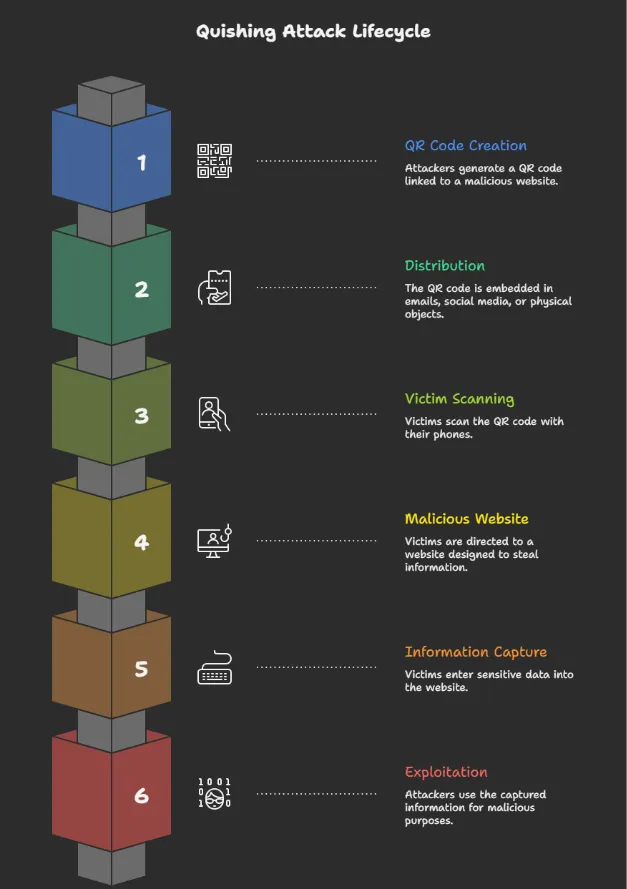
When a victim scans the QR code with their phone, they are redirected to a malicious website that looks legitimate. The site then asks for sensitive information such as login credentials, financial details, or personal data like name, email address, date of birth, or account information.
Once collected, attackers can misuse this data for identity theft, financial fraud, account takeover, or ransomware attacks, making quishing a growing and dangerous social engineering threat.
Real-life quishing examples
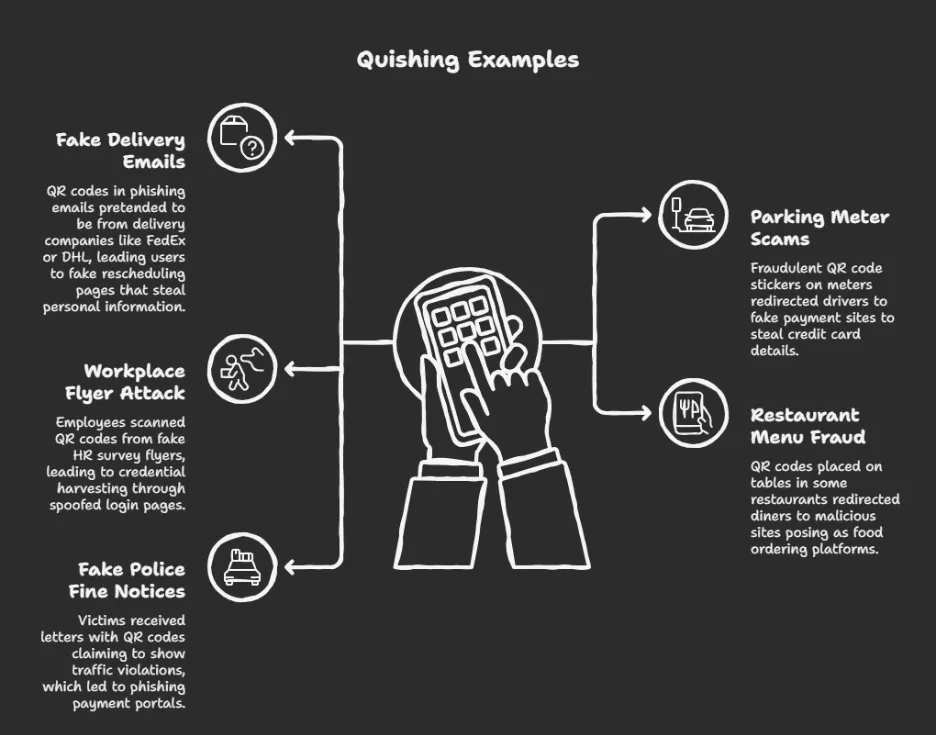
Quishing attacks have been on the rise globally, targeting people in both digital and physical settings.
How to Prevent Quishing
Quishing is hard to spot because QR codes are widely trusted. These steps help individuals and organizations stay safe:
1. Be cautious with QR codes in emails
Don’t scan QR codes from unexpected or suspicious emails, even if they look legitimate.
Be wary of urgency-based messages like “Verify now,” “Reset password,” or “Claim your reward.”
2. Preview the link before opening
Most smartphones show the URL before opening it, check carefully:
- Is the domain correct and familiar?
- Any misspellings or strange characters?
- Does it use HTTPS?
If it looks suspicious, don’t proceed.
3. Use secure QR scanner apps
Choose QR scanners or mobile security apps that preview links and flag malicious sites before opening them.
4. Avoid random QR codes in public places
Be careful with QR codes on posters, parking meters, menus, or ads, attackers often place fake stickers over real ones.
5. Verify the source
If a business sends a QR code, visit its official website directly or contact them through known channels.
Legitimate companies rarely require QR codes for logins or payments.
6. Train employees (for organizations)
Run security awareness training to explain quishing tactics and red flags.
Share real-world examples to improve recognition and response.
7. Physically inspect QR codes
Check if a QR code looks tampered with or pasted over another one.
When unsure, ask staff or use a trusted app to access the information.
Loginsoft Perspective
At Loginsoft, quishing is treated as an emerging social engineering threat that blends physical and digital attack vectors. Through our Threat Intelligence, Vulnerability Intelligence, and Security Engineering Services, we help organizations detect and respond to quishing campaigns.
Loginsoft supports quishing defense by
- Tracking QR-based phishing campaigns
- Enriching detections with threat intelligence
- Identifying malicious QR destinations
- Supporting user awareness strategies
- Reducing exposure to mobile phishing threats
Our intelligence-led approach helps organizations stay ahead of evolving phishing techniques.
FAQs
Q1. What is quishing?
Quishing is a phishing attack that uses QR codes to deliver malicious links.
Q2. How is quishing different from phishing?
Quishing uses QR codes instead of clickable links or emails.
Q3. Why is quishing dangerous?
Because QR codes bypass traditional security filters and target mobile users.
Q4. Where are quishing attacks commonly found?
In emails, public posters, payment points, menus, and invoices.
Q5. How does Loginsoft help protect against quishing?
Loginsoft tracks quishing campaigns and enriches detection using threat intelligence.
Explore the key security, speed, and performance differences between TLS 1.3 and TLS 1.2


