
Virus in Cybersecurity
What Is a Virus
A Virus or A Computer virus is a type of malicious software designed to disrupt systems, degrade performance, and cause data loss or leakage. One of its defining characteristics is its ability to replicate and spread across files, programs, and devices.
Most computer viruses attach themselves to an executable host file. When that file is opened or run, the virus code is executed. From there, it can propagate through networks, removable drives, file-sharing applications, or infected email attachments, spreading rapidly across systems.
Common Signs of a Computer Virus
Computer viruses often leave behind warning signs. Some of the most common indicators include:
1. Sluggish System Performance
If a computer suddenly starts running slower than usual, across the operating system, applications, or internet connectivity and it may be infected. This is especially suspicious if no resource-intensive programs are installed.
2. Unexpected Pop-Ups
Frequent or intrusive pop-up windows, either on the desktop or within web browsers, are a strong sign of malware activity, including viruses or spyware.
3. Programs Opening or Closing on Their Own
Applications that crash unexpectedly, close without warning, or fail to launch properly may have been compromised by a virus.
4. Forced Account Logouts
Certain viruses target specific applications and services, causing users to be logged out automatically or preventing stable access.
5. System Crashes
Sudden shutdowns, freezes, or unusual error messages are common symptoms. In some cases, infected systems may open files automatically or register random keystrokes.
6. Emails Sent Without Your Knowledge
Viruses often spread via email. If your account sends messages you didn’t write, it may have been hijacked to distribute malware to others.
7. Changes to Browser or System Settings
Unexpected modifications, such as altered homepages, default search engines, or browser configurations, can indicate a virus infection.
What Does a Computer Virus Do?
Once active, a virus can cause a wide range of damage, including:
- Corrupting or deleting data
- Stealing sensitive information, such as credentials or financial details
- Logging keystrokes to capture passwords and messages
- Consuming system resources, leading to slow performance and crashes
- Self-replicating, increasing network traffic and spreading further
Some viruses are overtly destructive, wiping files or damaging operating systems. Others are subtler but still disruptive, silently degrading performance or enabling additional attacks.
Virus vs. Malware: What’s the Difference?
Although often used interchangeably, viruses and malware are not the same thing.
All viruses are malware, but not all malware are viruses.
What Causes Computer Viruses?
Computer viruses are intentionally created programs designed to damage systems rather than provide functionality. They are typically written by threat actors with varying motivations, including:
- Ego or notoriety - Gaining recognition within hacking communities
- Cybercrime - Enabling ransomware, fraud, or identity theft
- Sabotage - Intentionally damaging systems, sometimes by insiders
- Cyber espionage - State-sponsored attacks using advanced persistent threats (APTs)
Viruses often exploit weaknesses in operating systems, browsers, or applications. While users typically must initiate execution, such as opening a file but some attacks leverage browser vulnerabilities or malicious third-party plugins.
Common delivery methods include phishing emails, malicious downloads masquerading as legitimate software, infected macros, or compromised software installers.
How Computer Viruses Work
At their core, computer viruses are covert programs that rely on other files or applications to function and spread.
The Infection Process
Viruses attach themselves to legitimate files or macro-enabled documents. When the file is opened, the virus executes and begins spreading.
Staying Hidden
To evade detection, viruses may use techniques like encryption or polymorphism, which alters their code signature to avoid antivirus identification.
The Damage Phase
Once activated, a virus can steal data, corrupt files, degrade performance, or crash systems. It may spread further when users unknowingly share infected files or devices.
Common Types of Computer Viruses
Notable Examples of Computer Viruses
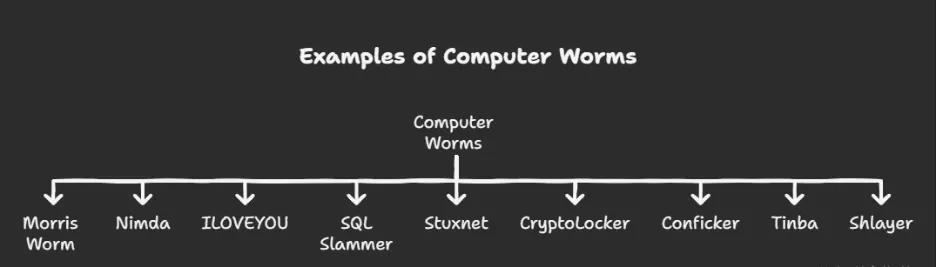
Over the years, several viruses have demonstrated the real-world impact of malware:
- Morris Worm (1988) - One of the first major Internet worms, causing widespread system crashes
- ILOVEYOU (2000) - Spread via email attachments disguised as love letters
- Nimda (2001) - Rapidly infected Windows systems and web servers
- SQL Slammer (2003) - Exploited SQL Server vulnerabilities, causing massive network congestion
- Stuxnet (2010) - A sophisticated worm targeting industrial control systems
- Conficker (2008) - Created a large botnet by exploiting Windows vulnerabilities
- CryptoLocker (2013) - Encrypted user files and demanded ransom
- Tinba (2012) - Banking Trojan focused on credential theft
- Shlayer (2018–present) - macOS-focused Trojan distributing adware and unwanted software
These examples highlight how viruses can differ dramatically in scale, purpose, and impact.
How to Prevent Computer Virus Attacks
Preventing computer viruses requires a combination of technical controls and user awareness.
Effective prevention includes
- Endpoint protection and antivirus software
- Regular system updates and patching
- Email and attachment filtering
- Restricting untrusted software execution
- User education and safe browsing habits
Early detection helps limit virus spread.
Computer Viruses in Modern Cybersecurity
While newer malware types have emerged, computer viruses continue to exist, often blended with modern attack techniques. Some viruses now act as delivery mechanisms for ransomware or spyware.
Understanding traditional threats like viruses remains important for comprehensive cybersecurity defense.
Loginsoft Perspective
At Loginsoft, computer viruses are viewed as foundational malware threats that still play a role in modern attacks. Through our Threat Intelligence, Vulnerability Intelligence, and Security Engineering Services, we help organizations detect and mitigate virus infections.
Loginsoft supports virus defense by
- Tracking malware and virus campaigns
- Enriching detection with threat intelligence
- Identifying infection vectors
- Supporting rapid containment and response
- Reducing exposure to recurring malware threats
Our intelligence-led approach helps organizations stay protected against both classic and evolving malware.
FAQs
Q1. What is a computer virus?
A computer virus is malicious software that infects files and spreads when they are executed.
Q2. How does a computer virus spread?
Through infected files, email attachments, removable media, or compromised software.
Q3. Is a computer virus the same as malware?
A virus is a type of malware, but not all malware is a virus.
Q4. Can antivirus software stop computer viruses?
Yes. Antivirus tools help detect, block, and remove viruses.
Q5. How does Loginsoft help protect against computer viruses?
Loginsoft tracks virus campaigns and enhances detection using threat intelligence.
Explore the key security, speed, and performance differences between TLS 1.3 and TLS 1.2


