
- Standard audit tools do not detect intentionally malicious packages. Tools like npm audit and pip-audit focus on known vulnerabilities, not malware behavior. A newly published malicious package with no CVE or advisory can pass these checks undetected.
- The attack surface is trust, not just code. Typosquatting, dependency confusion, and malicious updates exploit package-manager resolution and implicit trust. Developers and CI pipelines may install packages without verifying their provenance or behavior.
- Registry controls are only one layer of defense. Registry scanning, malware detection, and maintainer 2FA reduce risk, but attackers exploit gaps between these controls. Effective protection combines behavioral analysis, dependency pinning, SBOM governance, and build-environment isolation.
Summary
OneNote has been highly cherished by Threat Actors (TAs) in recent months. Unfortunately, many malware distributors have taken notice and are now using OneNote to deliver malicious files to their victims. These actors attach malicious files to a page within OneNote and then share it with their targets as a .one file. The ONE file reaches its targets through phishing emails. Upon opening the attachment, the victim’s computer is compromised.
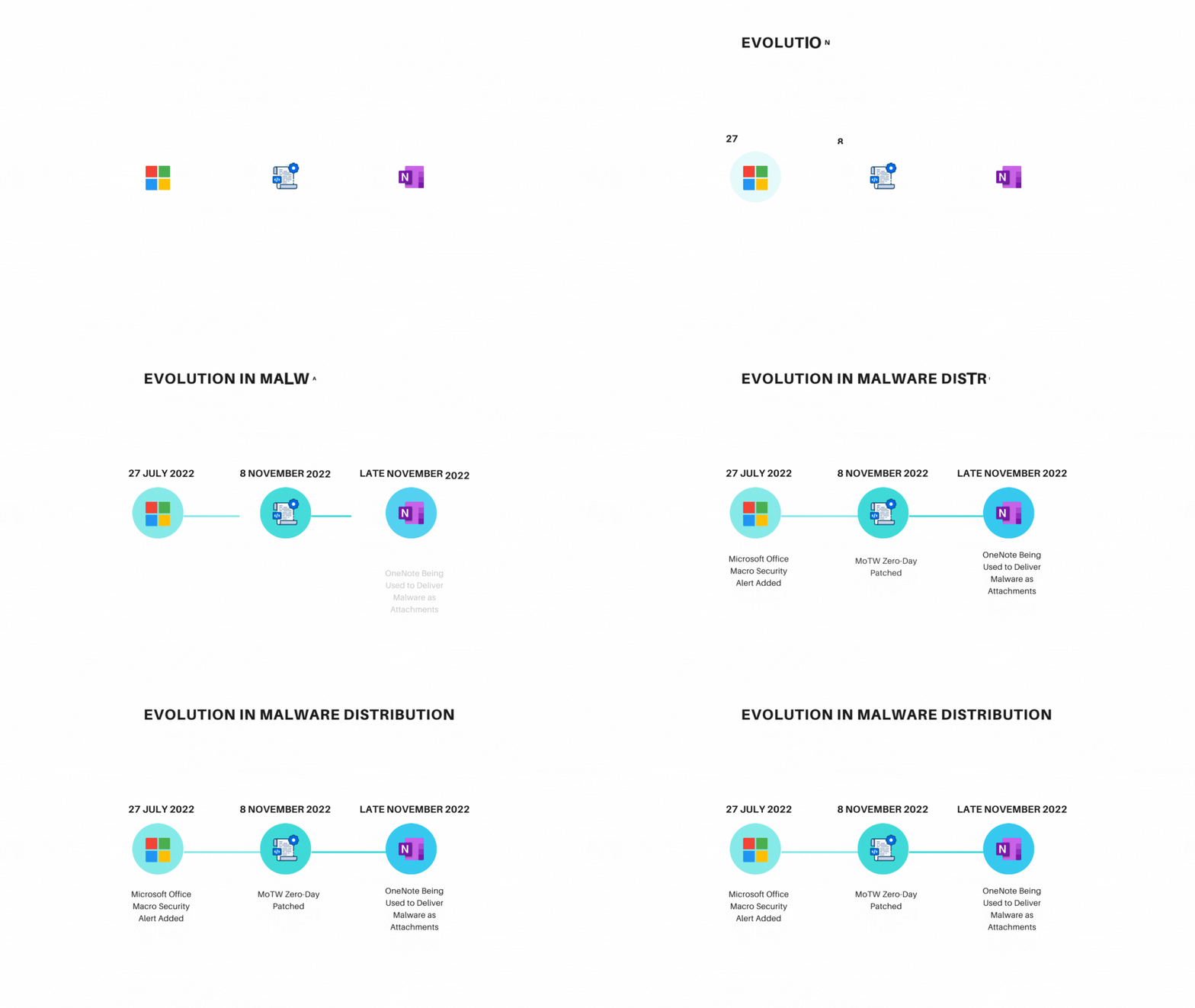
Evolution
The inclusion of the MoTW flag and disabling macros in Microsoft Office applications has resulted in a notable reduction in the use of MS Word and other executables for distributing malware. OneNote enables its users to attach files without constraints, making it a convenient means for TAs to deliver malicious payloads. To address this concern, Microsoft has introduced a warning dialog box that prompts users when attempting to open an attachment.
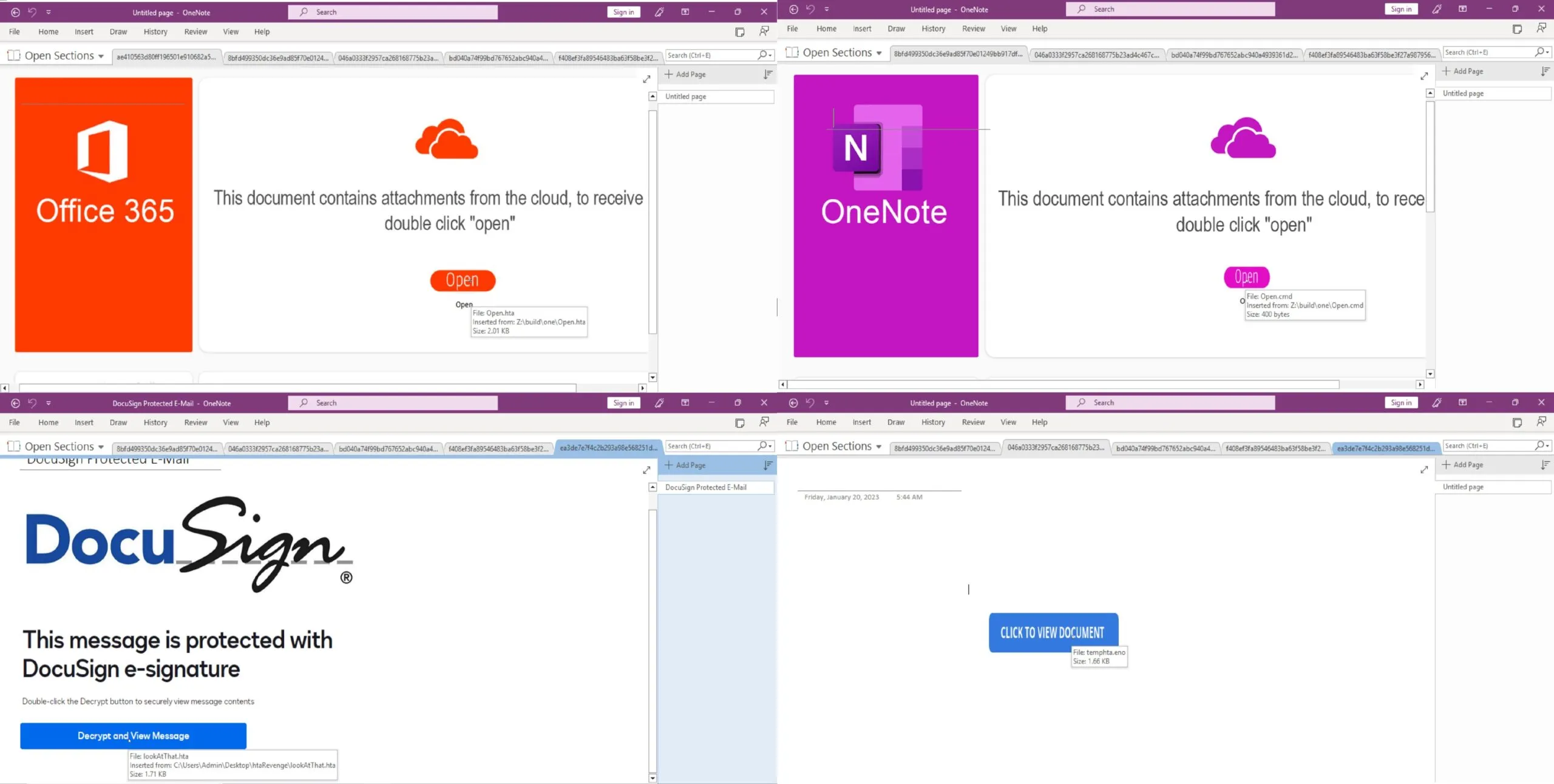
How TAs are using OneNote
OneNote malware campaign is propagated via phishing emails, with Emotet being the latest malware to take part in this campaign. The attackers employ a tactic of deception by displaying a counterfeit button, concealing the actual harmful attachment underneath it. Victims are lured into clicking the button with the promise of accessing the document upon clicking the fake button. Nviso Labs also reported the use of embedded URLs by the TAs to deliver their payload.
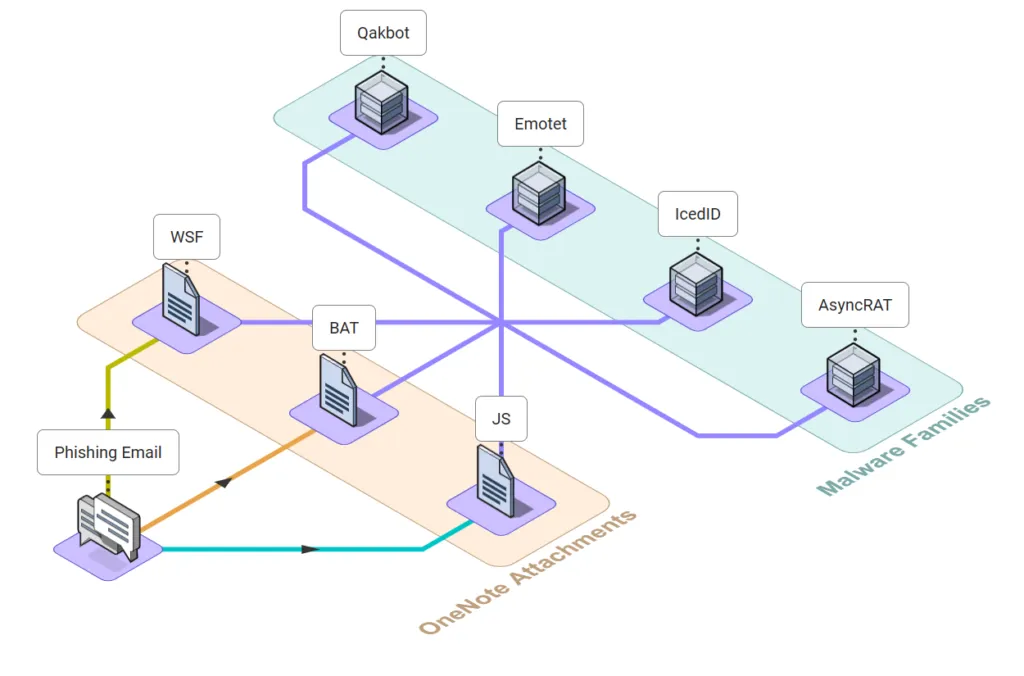
The threat actors have been disseminating the malware by using various file types as attachments. Our findings reveal that the primary purpose of these attachments is to download and execute the intended malware. Presented below is a list of some file extensions that the TAs favor.
One noteworthy technique that was observed involved the use of Right-to-Left Override to masquerade the file extension. The malware has also been seen with double file extensions in order to evade detection.
In late November 2022, Qakbot was observed utilizing OneNote to distribute its malware and since then, numerous threat actors have followed suit, taking advantage of this feature. This campaign has brought together multiple malware families and integrated them into a unified approach. Threat actors still continue to incorporate OneNote as a tool in their arsenal for delivering their malware.
The chart below illustrates the distribution trend of malware by various TAs in the last four months. OneNote has been extensively used by Qakbot in recent months, which is evident from the chart. Emotet joined the campaign in March and has been consistently active since then. Meanwhile, AsyncRAT has shown a gradual rise in the number of malwares detected over the months, with a halt in March.
The OneNote Malware Campaign displayed no bias towards specific malware categories as it welcomed all types of malwares, including info-stealers and ransomware, with open arms.
A list of some popular malware utilizing the OneNote malware campaign that was observed, is provided below.
- Qakbot
- Agent Tesla
- AsyncRAT
- Redline
- IcedID
- Emotet
- Quasar
- XWorm
- Netwire RAT
- DOUBLEBACK (backdoor)
- Formbook
Malware samples using OneNote can be found in MalwareBazaar, and there are open-source tools developed by DidierStevens and knight0x07 that will be helpful for static analysis of the .one file format.
Prevention
As we mentioned earlier, the campaign is being spread through emails. An adequate way for your organization to protect itself is by either creating a rule in Microsoft Exchange Online or by creating a new Anti-malware policy to block emails containing .one files as attachments.
If these options are not feasible, you can limit the launching of embedded file attachments in OneNote by utilizing Microsoft Office group policies.
Creating an Attack Surface Reduction (ASR) rule on `D4F940AB-401B-4EfC-AADC-AD5F3C50688A` as shown below will help prevent the execution of OneNote attachments. If a user tries to open the attachment, they will receive a notification alerting them that the administrator has blocked this action.
Add-MpPreference -AttackSurfaceReductionRules_Ids D4F940AB-401B-4EfC-AADC-AD5F3C50688A -AttackSurfaceReductionRules_Actions EnabledDetection
OneNote Malware Campaign can be detected using sigma rules.
The below rule detects the creation of .one file in users machine.
logsource:
    category: file_event
    product: windows
detection:
    selection:
        TargetFilename|contains:
            - '\AppData\Local\Temp\'
            - '\Users\Public\'
            - '\Users\'
            - '\Windows\Temp\'
            - 'C:\Temp\'
        TargetFilename|endswith: '.one'
 condition: selection
As we highly observed the use of RUNDLL32 for the execution of the malware where the attachment was an .hta file. This behavior can be detected using the following rule.
logsource:
  product: windows
  category: process_creation
detection:
  selection_process:
    Image|contains: 'rundll32.exe'
    ParentImage|contains: 'mshta.exe'
    ParentCommandLine|contains|all:
      - '.hta'
      - 'OneNote'
condition: selection_process
All the attachments that we open from OneNote without saving them first is temporarily saved to the following path.
C:\Users\{username}\AppData\Local\Temp\OneNote\16.0\Exported\{DF885392-41F2-44A2-B034-3710120A9EAC}\NT\0\
The rule mentioned below was written on the above scenario on attachments with suspicious file extension.
logsource:
  category: file_event
  product: windows
detection:
  selection_image:
    Image|endswith:
      - '\onenote.exe'
      - '\ONENOTE.EXE'
    TargetFilename|contains|all:
      - '\AppData\Local\Temp\OneNote\'
      - '\Exported\'
      - '\NT\'
  selection_file_ext:
    TargetFilename|endswith:
      - '.bat'
      - '.dat'
      - '.exe'
      - '.hta'
      - '.vba'
      - '.vbe'
      - '.vbs'
      - '.wsh'
      - '.wsf'
      - '.js'
      - '.scr'
      - '.pif'
      - '.cmd'
      - '.chm'
      - '.ps'
      - '.lnk'
      - '.ps1'
      - '.ps2'
      - '.jse'
  selection_file_right2left: # FileContaining Right-to-Left Override
    TargetFilename|re: ^.*U+202E.*$
  selection_file_doubleExt: # File with Double File Extension
    TargetFilename|re: ^.*\.[a-zA-Z0-9]*\.[a-zA-Z0-9]*$
  condition: selection_image and 1 of selection_file*
Additional detections for this campaign have been shared by mbabinski and SigmaHQ for the community.
For more threat analytics, contact our team.
MITRE ATT&CK Techniques
Threat Bites
References
- OneNote documents increasingly used to deliver malware
- New attacks, old tricks: How OneNote malware is evolving
- QakBot’s evolution continues with new strategies
- Trojanized OneNote document leads to FormBook malware
- Rapid7 observes Microsoft OneNote used to spread RedLine infostealer malware
To uncover the dark secrets of the Aurora Stealer Malware, check out the blog!
Table of Contents

Eight KEV Additions and a Third APT: Enterprise Infrastructure Tested on Every Front
Eight KEV Additions and a Third APT: Enterprise Infrastructure Tested on Every Front
Explore the key security, speed, and performance differences between TLS 1.3 and TLS 1.2
Ready to Find and Fix Your Security Weak Points?
LoginSoft's cybersecurity experts help organizations conduct thorough gap analyses, build prioritized remediation roadmaps, and achieve measurable security maturity improvements.
Schedule a Security Assessment
Hari Charan
Director of Security Research & Threat Intelligence
A MESSAGE FROM OUR TECHNOLOGY LEADER
The NVD enrichment cutback is not a surprise to us - it’s the inflection point we’ve been preparing for. At Loginsoft, we’ve spent years building the research depth and tooling infrastructure to independently enrich vulnerabilities at scale, with the accuracy and context modern security programs require. LOVI is our answer. Our mission is simple: ensure that no CVE relevant to your environment goes unanalyzed, unscored, or unactioned - regardless of what remains in NIST’s queue.
Key Takeaways
Stay Ahead
Get the Latest Cybersecurity Insights
Security research, threat intelligence, vulnerability updates, product news, and expert insights, delivered directly to your inbox. Stay informed. Stay secure.

BLOGS AND RESOURCES
Latest Articles


By using this website, you agree to the storing of cookies on your device to enhance site navigation, analyze site usage, and assist in our marketing efforts. View our Privacy Policy for more information.
Accept


© Copyright 2026, All Rights Reserved by Loginsoft
Privacy policy