
- Standard audit tools do not detect intentionally malicious packages. Tools like npm audit and pip-audit focus on known vulnerabilities, not malware behavior. A newly published malicious package with no CVE or advisory can pass these checks undetected.
- The attack surface is trust, not just code. Typosquatting, dependency confusion, and malicious updates exploit package-manager resolution and implicit trust. Developers and CI pipelines may install packages without verifying their provenance or behavior.
- Registry controls are only one layer of defense. Registry scanning, malware detection, and maintainer 2FA reduce risk, but attackers exploit gaps between these controls. Effective protection combines behavioral analysis, dependency pinning, SBOM governance, and build-environment isolation.
Most Azure Environments Are Less Secure Than Their Teams Think
Here's an uncomfortable truth: enabling Azure services is not the same as securing them. A storage account can be provisioned in seconds. Locking it down to prevent unauthorized public access, enforcing encryption at rest, and logging every access attempt -that takes intentional, structured effort.
That's precisely what the Microsoft Cloud Security Benchmark (MCSB) was designed to solve.
MCSB is Microsoft's primary security framework for Azure and multi-cloud environments. It's the default benchmark applied the moment you enable Microsoft Defender for Cloud on an Azure subscription -and it's the standard against which your Secure Score is measured. For organizations in regulated industries, it's also increasingly a baseline expectation from auditors, enterprise customers, and cyber insurers.
This guide gives you a complete picture of what MCSB is, how its control domains work, how it compares to its predecessor, and how to use it to build a genuinely secure Azure environment.
Key Takeaways
What every Azure security team should take away from MCSB:
- MCSB is your Azure security baseline, not a nice-to-have. It activates automatically with Defender for Cloud and drives your Secure Score. Ignoring it means ignoring your most direct compliance feedback loop. MCSB exists because it takes broad, vendor-neutral frameworks like NIST and Center for Internet Security and translates them into cloud-specific, Azure-aware controls that can be automatically assessed, scored, and remediated by Microsoft Defender for Cloud, making it a practical default baseline while still maintaining alignment with those underlying standards for compliance and governance."
- MCSB v2 adds AI Security coverage. If your organization is deploying Azure OpenAI or other AI workloads, preview v2 now -the seven AI controls will become standard requirements.
- The 12 control domains cover the full attack surface. Identity, network, data, logging, endpoint, DevOps
- MCSB is a compliance multiplier. Implementing it properly satisfies significant portions of CIS, NIST, PCI-DSS, and ISO 27001 simultaneously.
- Secure Score is a management metric, not just a technical one. A score trending upward over time is evidence of active security management -valuable for auditors, cyber insurers, and boards.
What Is the Microsoft Cloud Security Benchmark (MCSB)?
MCSB is a set of prescriptive security recommendations and best practices for protecting workloads, data, and services across Azure, AWS, GCP, and hybrid environments. It's built on input from Microsoft's Cloud Adoption Framework, the Azure Well-Architected Framework, and Microsoft's Secure Future Initiative (SFI) -the company's internal multi-year initiative to embed security into every stage of product design and operations.
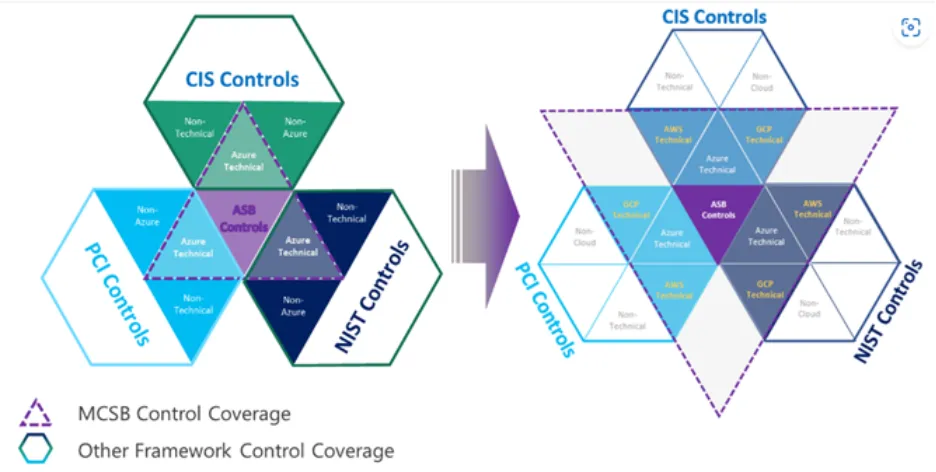
MCSB provides an efficient approach to compliance because its controls are already pre-mapped to industry benchmarks including CIS, NIST, and PCI-DSS -meaning a single MCSB implementation advances your posture across multiple standards simultaneously.
MCSB vs. Azure Security Benchmark: What Changed?
MCSB replaced the Azure Security Benchmark (ASB) in October 2022. The ASB was Azure-only. MCSB expanded that scope significantly:
The practical impact: teams managing hybrid or multi-cloud environments no longer need to build separate security standards for each cloud platform. MCSB provides a single control framework that guides across all of them.
MCSB v1 vs. MCSB v2
MCSB v1 is the current production standard. Expanding the prior simple basic control guideline to a more comprehensive, risk and threats-based control guide with more granular technical implementation examples and references details.
Expanding the control mappings to more industry regulations standards such as NIST CSF, PCI-DSS v4, ISO 27001, etc.
Alignment with SFI objectives to introduce Microsoft internal security best practices to our customers.
For organizations already deploying AI workloads on Azure -Copilot integrations, Azure OpenAI Service, custom ML pipelines -MCSB v2's AI Security domain should be on your radar now.
The 12 MCSB Control Domains Explained
MCSB v1 organizes its guidance into 12 control domains. Each domain contains numbered controls (e.g., NS-1, NS-2 for Network Security) with a security principle, compliance mappings, implementation guidance, and links to Azure Policy definitions.
1. Network Security (NS)
Covers segmenting Azure virtual networks, restricting traffic with Network Security Groups (NSGs) and Azure Firewall, using Private Endpoints to keep traffic off the public internet, and protecting DNS. NS-2 -securing cloud-native services with network controls -is one of the most frequently cited controls in audits, requiring Private Link and VNet integration wherever supported.
2. Identity Management (IM)
Covers centralized identity using Microsoft Entra ID (formerly Azure AD), MFA enforcement, conditional access policies, passwordless authentication, and integration with external identity systems. IM controls directly map to CIS Controls 5–6 and NIST PR.AA.
3. Privileged Access (PA)
Governs how privileged accounts (admins, service principals, managed identities) are created, monitored, and protected. Key controls include Privileged Identity Management (PIM) for just-in-time access, Privileged Access Workstations (PAWs), and break-glass account governance.
4. Data Protection (DP)
Covers classification of sensitive data, encryption at rest (Azure Storage Service Encryption, Transparent Data Encryption), encryption in transit (TLS 1.2+), and key management via Azure Key Vault. Organizations handling PII, PHI, or financial data should treat this domain as non-negotiable.
5. Asset Management (AM)
Ensures organizations maintain an accurate inventory of all Azure resources, enforce tagging policies, define secure configuration baselines, and use Cloud Security Posture Management (CSPM) to detect drift. Without asset visibility, you can't protect what you don't know exists.
6. Logging and Threat Detection (LT)
Covers audit log collection via Azure Monitor and Microsoft Sentinel, alert configuration for high-severity events, and integration with SIEM platforms. Defender for Cloud calculates secure score controls every eight hours for each Azure subscription or cloud connector, making logging and detection gaps visible in near real time.
7. Incident Response (IR)
Requires documented IR plans, defined roles, forensic readiness, and communication procedures. Many Azure organizations have strong preventive controls, but underdeveloped IR capabilities -a gap that becomes expensive during an actual incident.
8. Posture and Vulnerability Management (PV)
Covers regular vulnerability scanning of VMs, containers, and registries (via Microsoft Defender for Servers and Defender for Containers), defined patching SLAs, and secure configuration baselines across compute resources.
9. Endpoint Security (ES)
Governs endpoint detection and response (EDR) coverage via Microsoft Defender for Endpoint, device compliance policies, and anti-malware configurations for Azure VMs and hybrid machines.
10. Backup and Recovery (BR)
Covers backup policies, Recovery Time Objectives (RTO) and Recovery Point Objectives (RPO), geo-redundant backup storage, and ransomware resilience through immutable backups and access controls on backup infrastructure.
11. DevOps Security (DS)
Addresses secure software development pipelines, secrets management (no hardcoded credentials), SAST/DAST integration in CI/CD, and container image security scanning. As DevOps practice matures in Azure environments, this domain is increasingly scrutinized.
12. Governance and Strategy (GS)
Establishes the organizational security strategy, cloud security roles and responsibilities, resource management hierarchy, and Zero Trust adoption roadmap. This domain connects technical controls to executive accountability -a prerequisite for everything else working properly.
MCSB and Microsoft Defender for Cloud: The Compliance Engine
The real power of MCSB isn't just the framework itself -it's how deeply it integrates with the Azure security toolchain.
When Defender for Cloud is enabled, MCSB automatically starts assessing resources in scope and the compliance dashboard provides a dedicated benchmark view to help monitor resource compliance against benchmark controls, covering Azure subscriptions, AWS accounts, and GCP projects.
Secure Score: Your MCSB Progress Metric
MCSB consists of a series of compliance controls, each with a logical group of related security recommendations reflecting your vulnerable attack surfaces. Your score improves only when you remediate all recommendations within a control - all resources must comply with all recommendations to gain the full points for that control.
Defender for Cloud now offers two score models: the classic Secure Score (available in the Azure portal) and the newer Cloud Secure Score in the Microsoft Defender portal, which incorporates asset risk factors and criticality for more accurate prioritization.
Most mid-market companies operate within a Secure Score range of 40–60%, while organizations with strict regulatory requirements in finance and healthcare should target 75% or higher.
What MCSB Automates for You
- Azure Policy built-in definitions enforce MCSB controls automatically across subscriptions
- Regulatory compliance dashboard tracks MCSB adherence alongside CIS, NIST, PCI-DSS, and SOC 2
- Remediation guidance provides step-by-step fixes for each failing control, with one-click Fix options for many recommendations
- Continuous assessment runs every eight hours, surfacing new misconfigurations as your environment changes
How MCSB Maps to CIS and NIST
One of MCSB's most underappreciated advantages is that it functions as a multiplier. Each MCSB control carries the equivalent CIS Controls v8 IDs and NIST SP 800-53 references directly in its documentation.
This mapping means that auditors reviewing your organization against NIST or CIS can use your MCSB compliance dashboard as supporting evidence -reducing the duplicative effort of maintaining separate documentation for each framework.
Implementing MCSB: Where to Start
Step 1: Enable Microsoft Defender for Cloud
MCSB assessment begins automatically. Review your initial Secure Score and compliance dashboard to understand your starting posture.
Step 2: Prioritize High-Impact Controls
Focus first on Identity Management (IM) and Privileged Access (PA) -these controls carry the highest Secure Score point values and address the most common Azure attack vectors (compromised credentials, lateral movement).
Step 3: Enforce Azure Policy
Move from monitoring to enforcement. Use MCSB's built-in Azure Policy initiative to automatically deny or remediate non-compliant resource configurations at deployment time.
Step 4: Address the Logging Gap
Many organizations have resources deployed before logging is configured. Conduct a retroactive audit using the LT domain controls to ensure all subscriptions are fed into a centralized log workspace.
Step 5: Map Your Other Compliance Obligations
Use the MCSB-to-CIS and MCSB-to-NIST mappings to satisfy multiple audits from a single evidence base. Defender for Cloud's regulatory compliance dashboard makes this export ready.
How Loginsoft Helps Azure Teams Implement MCSB
The current paragraph reads like a generic, out-of-the-box description. It would be more impactful to emphasize Loginsoft’s proven experience in handling the areas mentioned above, along with its insights, industry best practices, and expertise as a cybersecurity organization.
Azure Security Assessment - We evaluate your current MCSB compliance posture, identify your highest-risk control gaps, and deliver a prioritized remediation roadmap.
Defender for Cloud Configuration - We configure Microsoft Defender for Cloud, Azure Policy enforcement, and Sentinel integration aligned to MCSB control requirements.
Compliance Mapping - We produce audit-ready documentation mapping your MCSB implementation to CIS, NIST, PCI-DSS, or other applicable frameworks -from a single evidence base.
Ongoing Monitoring - We operate continuous MCSB compliance monitoring, alerting your team to new gaps before they become audit findings or breach vectors.
Schedule a Free Azure Security Assessment with Loginsoft →
FAQs
1. What is the Microsoft Cloud Security Benchmark (MCSB)?
MCSB is Microsoft's consolidated set of security recommendations for Azure and multi-cloud environments. It organizes guidance into 12 control domains and integrates directly with Microsoft Defender for Cloud for automated compliance assessment and scoring.
2. What is the difference between MCSB and the Azure Security Benchmark?
The Azure Security Benchmark was Azure-only. MCSB expanded its scope to cover AWS and GCP as well, added cross-framework mappings to CIS, NIST, and PCI-DSS, and introduced multi-cloud monitoring via a single Defender for Cloud dashboard.
3. Is MCSB mandatory for Azure environments?
MCSB is technically a recommendation, not a regulatory mandate. However, it is applied by default when Defender for Cloud is enabled, and it forms the basis of the Azure Secure Score. For organizations in regulated industries -finance, healthcare, government -it functions as an expected baseline.
4. How does MCSB relate to Defender for Cloud's Secure Score?
MCSB controls drive the Secure Score in Azure. When Defender for Cloud is enabled, it continuously assesses your resources against MCSB and scores each control based on how many recommendations are fully remediated across all in-scope resources.
5. Does MCSB cover multi-cloud environments?
Yes. MCSB v1 includes approximately 180 AWS checks, and its controls apply to Azure, AWS, and GCP workloads. The Defender for Cloud Regulatory Compliance dashboard provides a single view across all connected cloud accounts.
6. What is MCSB v2 and when will it be generally available?
MCSB v2 is currently in preview. It adds an AI Security domain with seven controls, over 420 Azure Policy built-in definitions, and expanded risk-based implementation guidance. General availability has not been announced as of March 2026.
Table of Contents
Eight KEV Additions and a Third APT: Enterprise Infrastructure Tested on Every Front
Eight KEV Additions and a Third APT: Enterprise Infrastructure Tested on Every Front
Explore the key security, speed, and performance differences between TLS 1.3 and TLS 1.2
Ready to Find and Fix Your Security Weak Points?
LoginSoft's cybersecurity experts help organizations conduct thorough gap analyses, build prioritized remediation roadmaps, and achieve measurable security maturity improvements.
Schedule a Security Assessment
Hari Charan
Director of Security Research & Threat Intelligence
A MESSAGE FROM OUR TECHNOLOGY LEADER
The NVD enrichment cutback is not a surprise to us - it’s the inflection point we’ve been preparing for. At Loginsoft, we’ve spent years building the research depth and tooling infrastructure to independently enrich vulnerabilities at scale, with the accuracy and context modern security programs require. LOVI is our answer. Our mission is simple: ensure that no CVE relevant to your environment goes unanalyzed, unscored, or unactioned - regardless of what remains in NIST’s queue.
Key Takeaways
Stay Ahead
Get the Latest Cybersecurity Insights
Security research, threat intelligence, vulnerability updates, product news, and expert insights, delivered directly to your inbox. Stay informed. Stay secure.

BLOGS AND RESOURCES
Latest Articles
By using this website, you agree to the storing of cookies on your device to enhance site navigation, analyze site usage, and assist in our marketing efforts. View our Privacy Policy for more information.
Accept


© Copyright 2026, All Rights Reserved by Loginsoft
Privacy policy